Enough to decide whether Claude Code is worth it for you, and which surface to start with. The hands-on part is in the dedicated guide.
Claude Code reads your project, edits files, runs commands and fixes what breaks, on your machine or in the cloud. It's Claude's agent for code and files.
This chapter is the entry point. The Claude Code guide has 22 entries: 20 chapters, my full setup and an appendix on terminal basics.
Who it's for
Developers first, who want an AI coworker plugged into their codebase. But also technical PMs who read code without bothering the team, and entrepreneurs who build their own software without living in the editor.
And non-developers. You describe what you want in plain English, Claude Code writes the code, tests it and runs it. An app prototype, a script that sorts your files, a personal website. You don't need a year of training for that.
What it can do
Claude opens the right files and edits them, and you see every diff (the list of changed lines). It also runs commands, tests, builds, database migrations or deployments, then reads what they return.
In plan mode, it first proposes a strategy and waits for your go-ahead. On a big job, it can delegate to subagents: copies of Claude that handle a subtask in parallel and only send back a summary. One subagent explores the code while another writes the tests, for example.
Finally, it connects to Notion, Vercel, Supabase, Figma or Gmail through MCP (Model Context Protocol), the standard that connects Claude to an outside service. It isn't limited to your disk.
Where it runs in October 2026
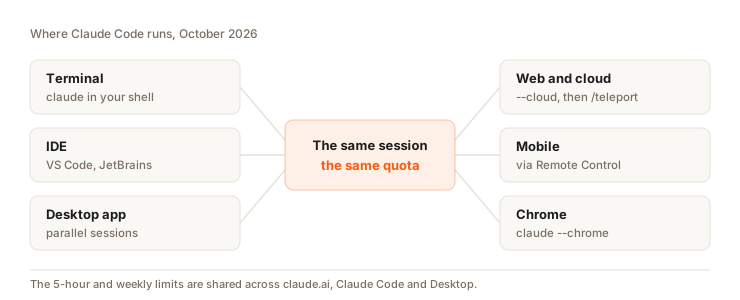
| Surface | How you open it | Good for |
|---|---|---|
| Terminal | claude in the project folder | Everything. It's the most complete version. |
| VS Code, JetBrains | Editor extension or integration | Staying in your IDE |
| Desktop app (Code tab) | Claude Desktop, Code tab | Running several jobs in parallel, with a built-in terminal, file editor and preview |
| Web and cloud | claude.ai/code, or claude --cloud from the terminal | A long task that keeps going when you close your laptop |
| Mobile | Remote Control, or the Code tab in the Claude app | Following and nudging a session from your phone |
| Chrome | claude --chrome, settings with /chrome | Testing a page, filling in a form, reading your browser console |
- The desktop app was rebuilt on April 14, 2026 for parallel sessions: a sidebar lists all active sessions, each one local or in the cloud.
- A cloud session runs on Anthropic's infrastructure. It counts against your limits, with no extra cost for the machine.
/teleportbrings it back into your terminal. - Remote Control is the opposite: the session runs on your machine, and your phone or a browser acts as a window onto it. Your computer has to stay on. It came out of preview in August 2026.
What changed in 2026
Nine changes to know if you learned Claude Code in 2025:
1. Opus 5.5 by default since September 22, 2026. It's the default model on every plan. You can switch to Fable 5.1, Sonnet 5.5 or Haiku 5.5 with /model. All four have 1 million tokens of context (context is everything Claude has in front of it during the session; a token is a piece of a word). Effort, set with /effort, controls how much Claude thinks before answering. It's on medium by default with the 5.5 models.
2. Auto mode by default since August 14, 2026. On Pro, Max and Team, new sessions start in auto mode. At the end of September 2026, the default was extended to every plan. Details in the permissions chapter.
Claude no longer waits for your go-ahead on every command. A classifier (a small checking model) reviews each action before it runs: it lets safe ones through and blocks anything destructive or aimed at production. After 3 blocks in a row, or 20 in total in a session, Claude Code goes back to manual approval. To unblock an action, write an approval that names the exact action and its target: a vague "go ahead" unblocks nothing, and some bans (the hard_deny rules) never give way.
3. /goal to finish the job on its own. Since May 2026, you set an end condition (/goal all tests pass). After each turn, a small model checks whether it's met. If not, Claude runs another turn. /goal clear stops it. A forgotten goal keeps restarting Claude, so clear it as soon as you change topics.
4. /loop and routines. /loop 5m check the deployment repeats an instruction at a fixed interval in your session. Routines, in research preview since April 14, 2026, run in the cloud on a schedule, an API call or a GitHub event. You create them at claude.ai/code/routines or with /schedule. Each run counts against your subscription limits. See chapter 9 and the autonomy chapter.
5. Workflows and ultracode. Since May 2026, Claude can write a script that orchestrates dozens to hundreds of subagents in the background. You trigger it with the word ultracode in your prompt, or /effort ultracode on. On Pro, you have to turn it on in /config, with a small size by default. Very effective for auditing a whole repo, very hungry for tokens.
6. Artifacts published from the terminal. Since June 18, 2026 (first on Team and Enterprise, now also Pro and Max), Claude Code publishes a private web page on claude.ai: a PR recap, a dashboard, a release checklist that updates during the session. /artifacts lists them.
7. /design and /slides. From a session, you create or edit a Claude Design design (chapter 5) or a Claude Slides deck, without leaving your project.
8. The 1-hour cache on subscriptions. The cache is the part of the conversation Claude has already read and can reread for almost nothing. On a subscription, it lasts 1 hour for your main conversation. Subagents only get 5 minutes, and it's 5 minutes everywhere with an API key or usage credits. After a longer break, the next message rereads everything at full price. My measurements on an empty session are in chapter 11: without the cache, every message would pay for everything again at full rate.
9. Mods, to change Claude Code itself. Since October 1, 2026, a plugin can ship JavaScript or TypeScript code that runs inside Claude Code. For example, a guardrail that asks for confirmation before an rm -rf. You describe what you want and Claude writes it with /plugin-authoring. A mod runs with your permissions and no sandbox, so only install the ones from authors you trust. The details are in the mods chapter of the Claude Code guide.
Found an old tutorial that mentions the # shortcut to write into CLAUDE.md
(your project's instructions file)? It was removed in version 2.0.70. Today,
ask Claude to edit CLAUDE.md, or use /memory.
How much it costs
Claude Code is included in Pro ($20 per month, $17 billed yearly), Max ($100 or $200 per month), Team and Enterprise. Not on the Free plan.
The limits:
- A session limit that resets every 5 hours, plus a weekly limit.
- They're shared with claude.ai, Claude Desktop and Claude Design. An afternoon in Design is that much less for coding.
- Anthropic doesn't publish any numbers per plan.
- Beyond that, on Pro and Max, usage credits take over at API rates (
/usage-credits). - The monthly API credits included in Max and Team since October 7, 2026 don't cover Claude Code.
To see where your tokens go: /usage. You get the breakdown by skill, subagent and MCP server, plus the cache read rate.
An order of magnitude, for my daily use: at API prices, my usage would be worth more than ten times what I paid for my subscription. The numbers are in chapter 11 and in the costs chapter of the Claude Code guide.
Claude Code or the Claude app
| You want... | Pick |
|---|---|
| Think, write, prepare a spec, ask questions about a document | The Claude app (chapter 2) |
| A long office task that runs in the cloud (research, report, deck) | The Claude app (chapter 7) |
| Edit code, run tests, work on a git repo | Claude Code |
| Work on files that have to stay on your machine | Claude Code desktop |
| A scheduled task on a repo | A Claude Code routine |
Since October 6, 2026, on Pro and Max, all new tasks in the Claude app (formerly Cowork) run in the cloud. The "Only on your computer" option is gone. For fully local work, Anthropic points you to Claude Code desktop. To pick up an old task there: "Download task data" in the task, unzip it, open the folder in Claude Code, then /port-task-data.
The full guide is here: installation, CLAUDE.md, permissions, agents, MCP, autonomy, costs. See the Claude Code guide.
Question
A whole afternoon tweaking mockups in Claude Design. In the evening, Claude Code hits your limit after half an hour. Why?
Pick an answer to see the explanation.
Key takeaways
- Terminal, IDE, desktop app, cloud, Chrome: Claude Code runs everywhere, and your phone works as a remote.
- By default, Opus 5.5 and auto mode (Pro, Max and Team since August 14, 2026, every plan since the end of September).
- The more it works on its own (
/goal,/loop, routines,ultracode), the more it uses. - Same limits as the Claude app and Claude Design.
- Work that has to stay on your machine goes through Claude Code desktop since October 6, 2026.