Let Claude Code keep going without you using /goal, /loop, cloud routines
and workflows that run dozens of agents, and know what can get expensive with
each one. Reading time: 14 minutes.
The idea
Up to now, you approve every turn: Claude proposes, you review, you send the next prompt. With the tools in this chapter, you set a goal or a rhythm, Claude chains the turns on its own, and you check the result at the end.
It only works under two conditions.
- Claude must not stop at every command. Without auto mode, it asks your permission to run the tests, and the autonomy ends at the first
npm test. Auto mode has been the default mode for new Pro, Max and Team sessions since August 14, 2026, and for every plan since late September 2026 (v2.1.283): a classifier allows what is safe and blocks destructive commands and production deploys. Details in chapter 9. - The end must be verifiable. A test suite that passes, a build that finishes without errors, an empty issue queue. If you can't say how to prove it's done, neither can Claude.
A detail that catches people out: in auto mode, a "go ahead" in the chat
doesn't lift a classifier block. For written approval to count, it has to name
the action and its exact target ("you can force push to the feat/onboarding
branch"), and it only covers that action. Some blocks never give way to
approval in the chat. To allow something you do often, add a rule in the Auto
mode tab of /permissions.
/goal: work until a condition is met
What it does
Shipped in v2.1.139, in May 2026. You write an end condition. After each turn, a separate model (the evaluator) reads the conversation and returns a verdict: not yet, met, or impossible. Not yet: Claude starts another turn by itself, with the evaluator's reason as its instruction. Met or impossible: the goal clears and an entry in the conversation records it.
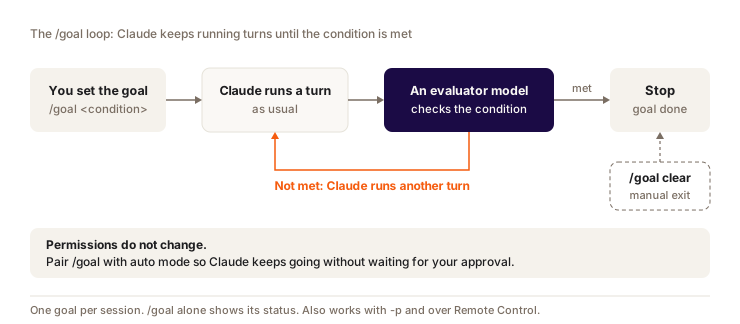
The goal also clears by itself when a turn fails on an error only you can fix: authentication refused, credits exhausted, a full context that auto-compact can't free up, model unavailable. Claude Code then shows Goal cleared after an unrecoverable error. You fix it, then run /goal again.
Syntax
/goal all tests in src/billing pass and npm run build finishes without errors
/goal
/goal clear
/goal <condition>sets the goal and starts a turn right away. No need to send a separate prompt./goalon its own shows the status: the condition, how long it has been running, the number of turns, tokens spent, the evaluator's last reason./goal clearstops everything (stop,off,cancelwork too). A/clearwipes the goal along with the conversation.- One goal per session. Setting a new one replaces the old one.
- While it runs, the
◎ /goal activeindicator shows.Ctrl+Oshows the reason behind each verdict.
It works interactively, remotely through Remote Control (from your phone) and non-interactively with -p, where the loop runs to the end in a single call:
claude -p "/goal CHANGELOG.md has an entry for every PR merged this week"
/goal doesn't change your permission mode. In manual mode, Claude will still ask you before running the tests. Combine it with auto mode: auto mode removes the per-tool approvals, /goal removes the per-turn approvals.
Writing a good condition
The evaluator doesn't run any command or open any file. It judges only on what Claude has shown in the conversation. So your condition has to describe proof that Claude can produce itself.
| Condition | What happens |
|---|---|
| "the code is clean" | Unverifiable. The evaluator guesses, Claude goes in circles. |
| "migrate src/api to the new HTTP client" | No clear end. Is 80% migrated done or not? |
| "the src/billing tests pass and npm run build finishes without errors" | Claude runs both commands, the output shows up, the evaluator reads it. |
"no more imports of old-http in src/api (checked with grep), npm test exits with 0, no test was modified" | A measurable end, its proof, and what must not change along the way. |
Add a limit so it doesn't run forever, for example or stop after 20 turns. Claude reports its progress against that limit at every turn. The condition can be up to 4,000 characters.
Example
You're moving a payment module to a new SDK version. You run:
/goal every call to stripe.charges in src/billing is migrated to paymentIntents,
npm test exits with 0, npm run build passes, no file outside src/billing is modified,
or stop after 15 turns
You go do something else. Claude migrates, runs the tests, sees two failures, fixes them, runs them again. The evaluator says "not yet" until the npm test output is green. When you come back, /goal shows you the number of turns and what it used. You review the diff before committing, as usual.
When the goal won't stop
A forgotten goal keeps running. On October 3, 2026, I had dropped a goal
without clearing it. The evaluator restarted the assistant 20 times in a row,
and it took a /goal clear to stop it. When you change your mind, clear the
goal right away. A goal that is still active also comes back when you resume
the session (--continue, --resume), with its turn counter reset to zero.
Claude Code has an emergency brake: if Claude answers the evaluator several turns in a row without using any tool, the loop stops and you take back control, with the goal still set. Don't count on it for a goal that progresses badly but still progresses.
The evaluator runs on the small fast model configured for your provider. According to the docs, its tokens are usually negligible next to the main turns. The real spending comes from the turns it triggers: each one sends the whole conversation again.
/loop: rerun at an interval
What it does
/loop reruns a prompt or a skill in a loop, as long as the session stays open. Close the terminal and the loop stops, unless you first sent the session to the background with /bg (see below). It's the tool for watching things: a deploy, a CI run, a PR in review.
Syntax
| You type | What happens |
|---|---|
/loop 5m check the deploy | Fixed interval. The prompt runs again every 5 minutes. |
/loop check the deploy | Self-paced. Claude picks the delay at each iteration, between 1 minute and 1 hour, based on what it sees. |
/loop | The built-in maintenance prompt, or the content of .claude/loop.md if it exists. |
/loop 20m /review-pr 1234 | Reruns a skill (here a /review-pr skill you would have created) at each iteration. |
The maintenance prompt picks up the work in progress in the conversation and takes care of your branch's PR: review comments, failing CI, conflicts. To replace it with your own instructions, write them in .claude/loop.md:
Look at the PR for the release/next branch. If CI is red, fetch the log of the
failing job, diagnose it and propose a minimal fix. If new review comments came
in, address them. If everything is green, say so in one line.
Example
You just pushed a branch, Vercel is building, and you want to know when it's done without refreshing the tab:
/loop 5m check whether the deploy of the feat/onboarding branch is finished, and if it failed, read the build logs and tell me why
Limits to know
- A recurring task expires after 7 days. That's on purpose: it caps what a forgotten loop can consume.
- 50 scheduled tasks max per session.
Escstops a self-paced loop that is waiting for its next iteration. Claude can also stop it itself when the work is done. For a fixed-interval loop, ask Claude: "cancel the deploy check task".- Schedules have a deliberate offset, so that all sessions don't hit the API in the same second: up to 30 minutes late for a recurring task (half the interval if it runs more than once an hour). For a one-off reminder at a precise time, avoid round minutes (
:00,:30).
Monitor: follow a command instead of checking back every 5 minutes
Monitor is a Claude Code tool (since v2.1.98, in April 2026). It runs a command in the background and sends each new output line back to Claude. For logs or CI, it beats a loop: Claude reacts to the line as it arrives instead of running a full turn every 5 minutes to see if anything moved.
Run npm run dev in the background with Monitor and tell me as soon as an error shows up in the logs.
When you ask for a self-paced /loop, Claude may also pick Monitor on its own.
What a loop costs
Each iteration is a full turn: the whole conversation goes out again, plus the result of the check. A loop every 5 minutes for 7 days is 2,016 turns. And on a subscription, the conversation cache lasts 1 hour: a loop spaced more than an hour apart starts cold at every iteration, at full price. For long, widely spaced monitoring, a routine is often a better fit.
Routines: scheduling in the cloud
What it does
A Claude Code configuration saved on your claude.ai account: a prompt, one or more GitHub repos, connectors and one or more triggers. Each run is a real Claude Code session running on Anthropic's infrastructure, so your laptop can be closed. It has neither your local files nor your local MCP servers, and it acts on your behalf.
Available since April 14, 2026, as a research preview, on Pro, Max, Team and Enterprise.
| Trigger | Example | Limit |
|---|---|---|
| Schedule | Every weekday at 9:07am, or once on a given date | Minimum interval: 1 hour |
| API | Your alerting tool sends an HTTP POST with a token | One token per routine |
| GitHub | A PR opens, a release ships |
A single routine can combine several triggers.
Syntax
Two paths. On the web, claude.ai/code/routines, New routine button. Or from the terminal, in plain language:
/schedule daily PR review at 9am
/schedule tomorrow at 9am, summarize yesterday's merged PRs
Claude asks its questions (which repos, which prompt, which schedule) and then saves the routine on your account. /routines is an alias. After that, /schedule list shows them, /schedule update edits one (for example to set a precise cron expression), /schedule run runs one right away. The API trigger is added from the web, the GitHub trigger from the web or the terminal.
/schedule requires being logged in with your claude.ai subscription (/login). With a Console API key, Bedrock or Google Cloud, the command isn't available.
If you need your local files
The desktop app offers a middle ground: local scheduled tasks (Routines page in the Code tab, New routine button, then Local). They run on your machine, with your files and your tools, up to once a minute. In exchange, the app has to be open and the computer on.
| Routine (cloud) | Desktop scheduled task | /loop | |
|---|---|---|---|
| Runs where | Anthropic's cloud | Your machine | Your machine |
| Machine off | It runs | It doesn't run | It doesn't run |
| Open session required | No | No | Yes |
| Local files | No, fresh clone of the repo | Yes | Yes |
| Minimum interval | 1 hour | 1 minute | 1 minute |
Example
Every weekday morning, a routine reads the issues opened the day before, adds labels, assigns them based on the area of code involved, and updates a summary page. That page can be an artifact: a private HTML page published on claude.ai, updated in place at the same URL. A routine can republish a private artifact you already published without asking. To create a new one, it asks. Publish the page once yourself, then hand it to the routine.
Where it gets stuck
- Quotas. Each run counts toward your subscription limits, like a normal session. The docs add hourly caps: 100 scheduled runs per hour on your account, 30 manual or API runs per hour per routine. When you hit your subscription limit, runs move to your usage credits if they are turned on (claude.ai/settings/usage), otherwise they are refused until your window resets. The daily caps announced in April (5, 15 or 25 runs per day) no longer appear in the October 2026 docs.
- No local MCP. The servers you added with
claude mcp addlive on your machine and don't come along. Add them as connectors on claude.ai, or, for a routine on a single repo, declare them in a committed.mcp.json. - A fresh clone. The routine starts from the default branch of the GitHub repo, not from your local files. It pushes to branches prefixed with
claude/, unless your prompt says otherwise. To lock things down, use GitHub's branch protection rules. - No permission prompts during the run, apart from some artifact publications. All your connectors are included by default, write access included. Remove the ones the routine doesn't need.
- A green run doesn't mean the task succeeded. The green status only says the session started and finished without an infrastructure error. Open the run and read what Claude did.
- It acts on your behalf. Commits, PRs, Slack messages: everything shows up as coming from you.
Dynamic workflows and ultracode
What it does
Since May 2026 (v2.1.154). A subagent is a Claude instance launched for a subtask, in its own context (see chapter 7). A dynamic workflow goes further: Claude writes a JavaScript script that orchestrates dozens, even hundreds, of subagents, and a runtime executes it in the background. Your session stays free. Intermediate results stay in the script, and your context only gets the final answer.
Keep it for tasks bigger than one conversation: an audit of the whole repo, a 500-file migration, research where sources have to be cross-checked against each other. Not for fixing a bug.
Syntax
ultracode: audit every endpoint in src/routes/ for missing auth checks
The ultracode keyword at the start of a prompt launches a workflow for that task only. Asking "use a workflow" in plain words works too.
/effort ultracode
/effort ultracode off
/effort ultracode turns on automatic orchestration for the whole session: Claude plans a workflow for every substantial task. In the /effort picker, the Tab key toggles the Ultracode switch.
/workflows
/deep-research What changed in the Node.js permission model between v20 and v22?
/workflows opens the progress view: each phase, its agents, what each one found, token usage. From there you can pause, stop (x) or save a run (s) to .claude/workflows/, where it becomes a reusable command. /deep-research is the built-in workflow: it runs web searches from several angles, cross-checks the sources and returns a cited report.
On Pro, workflows are turned on in /config (Dynamic workflows line), with a default size of "small", meaning fewer than 5 agents.
Keeping the size under control
A badly scoped workflow can cost a lot. Each agent sends its own requests,
with its own cache. Test on a slice first (one folder, a narrow question),
check usage in /workflows, then widen.
Claude Code shows a Large workflow warning when a run goes over 25 agents or 1.5 million planned tokens. It only warns, the run keeps going. To put a cap on it, set a size:
/config workflowSizeGuideline=small
With /effort ultracode on, every request consumes more and the warning disappears (you've already accepted big runs). Turn it off as soon as you're back to everyday work.
Background sessions and coordination
The previous tools run one task. These run several sessions in parallel, each one a real Claude Code conversation that keeps going with no terminal attached.
| Command | What it does |
|---|---|
claude --bg "your prompt" | Starts a background session from the shell. Before editing, it moves into its own worktree. |
claude agents | The sessions view (research preview): who is waiting for your answer, who is working, who is done. |
claude attach <id> | Opens a background session in this terminal. claude logs and claude stop exist too. |
/background (alias /bg) | Sends the current session to the background and frees your terminal. |
/fork [prompt] | Copies the conversation into a new background session, with its worktree. You carry on with yours. |
/subtask <task> | Launches a subagent that inherits the whole conversation. Its result comes back to you. |
/list-agents | Lists the sessions and subagents Claude can write to. |
A worktree is a separate working copy of the same git repo, on its own branch. Two sessions can edit the same file without stepping on each other.
Since August 2026 (v2.1.224), sessions talk to each other: Claude has the SendMessage and ListAgents tools, and you can mention a session with @. A session that finishes a migration can tell the one waiting to run the integration tests.
To keep track of all this away from your desk, Remote Control sends you push notifications on mobile and lets you answer from your phone.
claude --bg "investigate the flaky SettingsChangeDetector test"
claude --bg "update the API docs after the route renaming"
claude agents
Agent teams go even further: a lead agent supervises peers working in parallel on a shared task list. Experimental, turned on with CLAUDE_CODE_EXPERIMENTAL_AGENT_TEAMS=1. When the teammates run in plan mode, the docs mention about 7 times more tokens than a standard session.
On the cloud side, Anthropic also redesigned Claude Code projects on September 17, 2026 (beta, for some Pro and Max accounts): you set a goal, and a coordinator launches parallel threads with shared memory.
On quota, each background session draws from your limits, independently of the others. Three sessions in parallel means three times the usage.
Which tool for which need
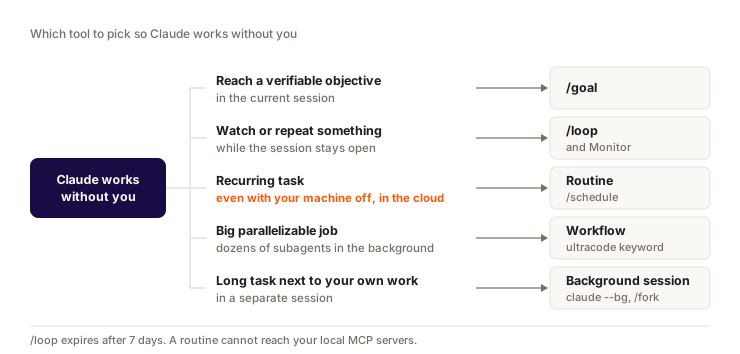
The table gives the details, including when each tool stops.
| Your need | Tool | Runs where | Stops when |
|---|---|---|---|
| Finish a task until the tests pass | /goal | Your session | Condition met, impossible, /goal clear |
| Watch a deploy every 5 minutes | /loop 5m | Your session, terminal open | You cancel, or after 7 days |
| React to live logs | Monitor | Your session | The command ends |
| Review PRs every morning, laptop closed | Routine (/schedule) | Anthropic's cloud | You turn it off |
| Audit the whole repo | Workflow (ultracode:) | Background | Script ends, or x in /workflows |
| Three independent tasks in parallel | claude --bg + claude agents | Your machine, one worktree each | Each session finishes |
| Try another approach without losing the thread | /fork | Background session | You close it |
Guardrails
Five safety nets to set up before you let it run.
- Isolate the work. Background sessions move into a worktree on their own. For subagents that write, ask for worktree isolation (chapter 7).
- Auto mode, not bypass. Auto mode keeps a classifier between Claude and dangerous commands.
--dangerously-skip-permissionson a session you're not watching removes that net. - Keep your deny list. Rules that block
rm -rf,git push --forceorsupabase db resetalso apply to turns nobody approves. Example in my configuration. - Cap the spending. A turn limit in the goal, a small size for workflows, a first run on a slice, then a look at
/usage. - Review before merging. A loop or a routine opens a PR or a draft. A human merges.
Never let a loop, a routine or a workflow push to production, send an email or write to an external tool without a human review. For a routine, remove the write connectors it doesn't need.
What autonomy costs
While you're not looking, it consumes. The mechanics to keep in mind:
- Each turn restarted by
/goalor/loopsends the whole conversation again. The bigger it gets, the more each turn costs. - On a subscription, the main conversation cache lasts 1 hour. The one for subagents and workflows lasts 5 minutes. A 50-agent workflow writes 50 caches, which expire fast.
- Agent teams use about 7 times more than a standard session when the teammates are in plan mode.
- Each background session and each routine run counts toward your subscription limits. Beyond that, it's your usage credits.
- The
/goalevaluator runs on the small fast model: it's the cheapest part. - On a subscription,
/usagelists your hungriest loops (one line per/loopor scheduled task, with its tokens per run). Check it after a loop's first day.
Caching, model choice and usage tracking are covered in chapter 19.
Question
You want a review of open PRs every morning at 9am, even when your Mac is off. Which tool?
Pick an answer to see the explanation.
Key takeaways
- A useful
/goalcondition has a measurable end, its proof and a turn limit. And/goal clearas soon as you change your mind. - Session open:
/loop. Laptop closed: a routine, which doesn't have your local MCP servers. - Workflows start on a slice, and nothing goes to production without a human reviewing it.
Sources
- Keep Claude working toward a goal (Claude Code docs)
- Run prompts on a schedule (/loop) (Claude Code docs)
- Automate work with routines and the April 14, 2026 announcement
- Schedule recurring tasks in Claude Code Desktop and Agent view (Claude Code docs)
- Orchestrate subagents at scale with dynamic workflows (Claude Code docs)
- Track and reduce costs (Claude Code docs)