Since October 1, 2026, you can write a mod: a plugin whose JavaScript or TypeScript code runs inside Claude Code.
The idea
Until now, you changed Claude Code from the outside, with a shell script wired to a hook or a skill that Claude reads. MCP servers add tools to it. A mod runs inside.
A plugin that contains JavaScript or TypeScript code that Claude Code calls in its own process, on every event it cares about: a tool call, a prompt you send, a part of the interface to draw. The code can look at the event, change it or answer it in place of Claude Code. It runs with your permissions, with no sandbox.
Mods arrived with Claude Code v2.1.287 in the terminal (the desktop app has run them since its v2.1.286). They're on by default. This chapter is written on v2.1.296, from October 9, 2026, and the API is in early access: it moves from one version to the next.
What only a mod can do:
- a panel next to the conversation or a band above the prompt, with buttons and input fields;
- its own version of something Claude Code already displays, like the line for a tool call or the spinner;
- hold a tool call while it asks you a question, or answer it without running the tool;
- a
/somethingcommand that runs your code right away, with no Claude turn, even while Claude is working.
One limit: the permission dialog. A mod can approve or refuse a call before the dialog shows up, but it can't change what the dialog displays.
Where it runs
| Where you launch Claude Code | The mod's hooks run | What it draws shows up |
|---|---|---|
claude in a terminal (including your editor's one) | Yes | Yes |
| Code tab in the desktop app | Yes | Yes, except terminal-only elements |
| WSL session in the desktop app | No | No |
| Chat panel of the VS Code extension | Yes | No |
claude -p and the Agent SDK | Yes | No |
| Remote Control from claude.ai or mobile | Yes, on your machine | In the terminal on your machine |
| Cloud session | Yes, if the plugin is there | No |
Mod, hook, skill, MCP, plugin: who does what
A plugin is the package: it installs in one command and can contain skills, commands, subagents, shell hooks, MCP servers and, since October, a mod.
The hook you already know (chapter
9): a shell command, an HTTP
request or a prompt declared in a settings.json file, which Claude Code runs
on an event like PreToolUse. The docs now call it a "settings hook". In this
chapter, plain "hook" means a function in a mod.
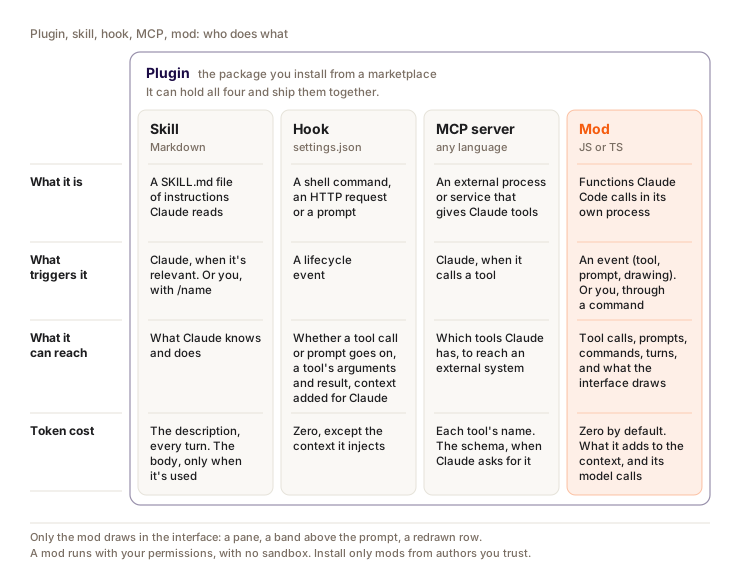
| Mod | Settings hook | Skill | MCP server | |
|---|---|---|---|---|
| What it is | Functions Claude Code calls in its own process | A shell command, an HTTP request or a prompt on an event | A SKILL.md file of instructions | An external process that provides tools |
| What it can change | Tool calls, prompts, commands, turns, what the interface draws | Let through or block, change arguments, add context | What Claude knows and does | The tools Claude has |
| Draws in the UI | Yes | No | No | No |
| What you write | JavaScript or TypeScript | A script and an entry in settings.json | Markdown | A server, in whatever language you like |
| Pick it when | You want a panel, a band, your own command, or to rewrite an event | You want to block, allow or log with an existing script | You keep pasting the same instructions in chat | Claude needs to reach an external system |
Settings hooks aren't deprecated: they run alongside mods, and a script that works has no reason to be rewritten.
Try a mod without writing anything
You already use some. Several Claude Code features are built-in mods, listed under Built-in in /plugin, Installed tab. cc-plugin-diff, for example, is the /diff panel. The others load AGENTS.md as project instructions (cc-plugin-agents-md), give Claude the plugin-authoring skill (cc-plugin-plugin-authoring), protect what your organization manages from the mods you install (cc-plugin-sec-default) and send Claude Code usage data (cc-plugin-telemetry).
The most telling one to try is cc-plugin-you-should-know, off by default. On a long task, a side agent rereads what Claude is doing and notes above the prompt what you or Claude might miss. According to the changelog, it works in direct sessions with Anthropic, with telemetry on.
/plugin enable cc-plugin-you-should-know@builtin
To see what a real mod looks like, the code of diff, agents-md, sec-default and telemetry is public, tests included, in the mods folder of the claude-code repo. Anthropic also publishes unsupported example mods in anthropics/claude-code-playground: token-weather (a forecast of your context window above the prompt), blast-radius (holds a risky command like rm -rf or a force push and shows you what it would change), replay-theater (a /replay command that replays the file edits from the last turn). To test one without installing it:
git clone https://github.com/anthropics/claude-code-playground
claude plugin validate claude-code-playground/claude-code/mods/blast-radius
claude --plugin-dir claude-code-playground/claude-code/mods/blast-radius
In the session, /plugin shows a line like 1 mod active · blast-radius under its tabs. Built-in mods don't appear there.
Write your own with /plugin-authoring
You don't need to know the API to start: the built-in plugin-authoring skill knows where to write the mod, what your version offers and how to load it. Claude loads it on its own when you ask for a mod, or you run it yourself.
- Describe the mod.
/plugin-authoringthen your request, or just "make me a mod that shows the git branch above the prompt". Claude writes it in~/.claude/dev-mods/<session id>/<mod name>/. That's a protected path: in manual or accept edits mode, Claude Code asks you before each file. - Turn on reloading. On the first file, Claude Code offers hot reload. "Enable for this session" loads the mod at the end of the turn, then reloads it on every turn that changes it. With "Not now", the files stay there and nothing loads.
- Check and iterate. The mod shows up in
/plugin, Installed tab, where you can turn it off. Tell Claude what's wrong: it fixes it, runsclaude plugin validate, and you test as soon as the turn ends. - Keep it. A mod written this way only lives in that session, and its folder is deleted along with old sessions (
cleanupPeriodDays). Copy it somewhere else, for example~/mods/git-branch, then load it withclaude --plugin-dir ~/mods/git-branch.
The mod doesn't load in a claude -p session or in dontAsk mode (nobody to approve), in a folder you haven't trusted, or with --safe-mode, --bare or disableAllHooks.
To change an existing mod, start the session with claude --plugin-dir ./my-mod and ask for the change: it reloads in the same session. Claude Code also drops your version's TypeScript declarations into the mod's .claude-plugin/types/. When they contradict the docs, they're the ones that are right.
claude plugin init doesn't create a mod. The command generates a classic
plugin (shell hooks, skills) in ~/.claude/skills/. A mod is the three files
from the example below, written by hand or by Claude.
Example 1: a guard on rm -rf and force pushes
What you want: Claude doesn't run rm -rf, or git push --force to main, without your yes. Other commands go through with no question.
Three files:
garde-fou/
├── .claude-plugin/
│   └── plugin.json      # the manifest, as for any plugin
└── hooks/
    ├── hooks.json       # points to your code
    └── register.ts      # your code: the hooks module
.claude-plugin/plugin.json:
{
  "name": "garde-fou",
  "version": "0.1.0",
  "description": "Asks for confirmation before an rm -rf or a git push --force to main",
  "author": { "name": "Your name" }
}
hooks/hooks.json:
{
  "description": "Hooks module of garde-fou",
  "modules": ["./register.ts"]
}
hooks/register.ts (the comments are enough to follow along, the anatomy right after details register, on and next):
import type { Register } from "claude-code";

// rm with both -r and -f, in any order (rm -rf, rm -fr, rm -Rf)
const RM_RF = /\brm\s+-(?=[a-z]*r)(?=[a-z]*f)[a-z]+/i;
// git push with --force or -f, aimed at main
const FORCE_MAIN = /\bgit\s+push\b(?=.*(--force\b|\s-f\b))(?=.*\bmain\b)/;

export const register: Register = (on) => {
  on("tool.call", { tool: "Bash" }, async ($, e, next) => {
    // Every other command goes on to the usual permission check
    if (!RM_RF.test(e.command) && !FORCE_MAIN.test(e.command)) return next(e);
    // Safe default: a question nobody answers refuses the command
    let answer = "Refuse";
    try {
      // The tool call waits here, outside the hook's time limit
      answer = await $.ui.ask(`Run \`${e.command}\`?`, ["Run", "Refuse"]);
    } catch {
      // Dismissed, or a claude -p run with nobody to ask
    }
    if (answer === "Run") return next(e);
    // No call to next: the command never runs, Claude reads this text
    return {
      deny: "The user refused this command. Ask them before trying anything else.",
    };
  }).catch(($, e, next) =>
    // Fail closed: if the guard crashed before deciding, nothing runs
    next.called ? next(e) : { deny: "The guard crashed: command not run." },
  );
};
When Claude tries rm -rf build, the call stops and the question shows up where Claude asks you its questions, with the command in it. Run sends the command to the usual permission check, which still applies. If you refuse, type something else or close the question, the command doesn't run and Claude reads the deny text as the tool result (hence the instruction written for it). In claude -p, nobody can answer: $.ui.ask fails and the command is refused.
The wait happens inside $.ui.ask, which doesn't count toward the 10 seconds the hook gets. A wait in your own promise would count, and a hook that runs out of time is skipped: the command would go through.
Checking, without installing anything:
$ claude plugin validate ./garde-fou
  ❯ ./register.ts hooks: tool.call{tool=Bash}
  ❯ ./register.ts gating hook with .catch: tool.call{tool=Bash}
  ❯ ./register.ts calls: $.ui.ask

✔ Validation passed
The gating hook with .catch line confirms that the hook can refuse an action and that it has its fallback (without the .catch, it would say without .catch).
This guard doesn't stop everything. The mod reads the text of the command:
rm -r -f, an alias or a script that does the rm for it all get through. To
really protect main, protect the branch on your Git host. The docs say the
same about their own git push guard example.
Anatomy of a mod
The files
The guard's manifest is nothing special. What turns a plugin into a mod is the modules key in hooks/hooks.json: the path to a single file, relative to hooks.json.
The file modules points to. It exports a register(on, options) function
that Claude Code calls at load time. options holds the settings the user
entered (more on that with userConfig). The file is an ES module in .js,
.ts, .tsx, .mjs or a cousin: no require, no dynamic import(), no
build step.
The code runs isolated, with no Node and no DOM: no fs, no global fetch, no setTimeout. Standard web APIs (URL, TextEncoder, AbortController, crypto.subtle) are there, and everything else goes through an object Claude Code hands you: $.
register, on, and the shape of a hook
Inside register, each call to on wires a function to an event:
on("tool.call", { tool: "Bash" }, async ($, e, next) => next(e));
The second argument, optional, is the matcher: a filter on the event's fields. A value ({ tool: 'Bash' }), a list ({ tool: ['Edit', 'Write'] }) or a regex ({ tool: /^mcp__github__/ }). Without a matcher, your function sees every event with that name.
Each hook gets three arguments:
$, the engine interface: anything your mod does outside its own code (display, call a model, read a file, run a command) goes through it;e, the event, as plain frozen data: the tool name and its arguments, the prompt text... To change it, you pass a copy tonext;next, what comes after:next(e)hands the event to the other mods, then to Claude Code's normal behavior, and returns the result.
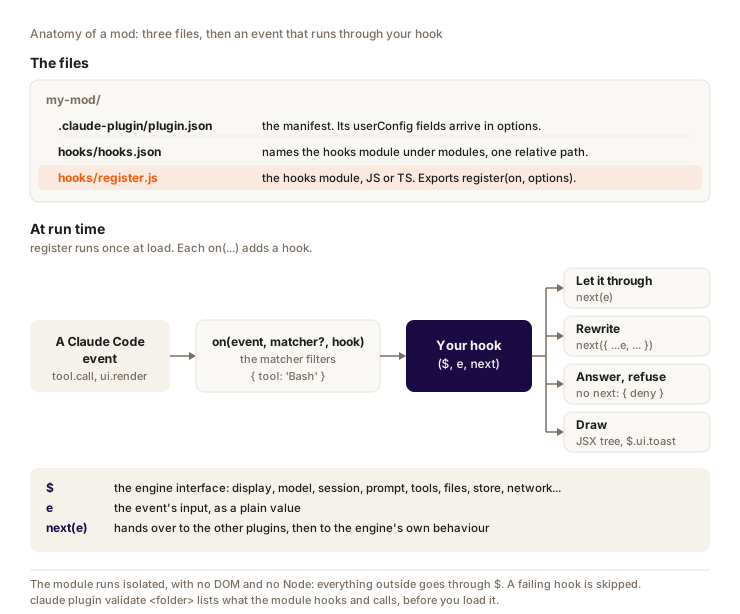
What your hook returns decides the effect:
| Your hook returns | Effect |
|---|---|
next(e) | Observe: the event goes on unchanged |
next({ ...e, text: e.text.trim() }) | Rewrite: what comes after only sees your version |
An object without calling next, like { deny } | Answer: neither the other mods nor Claude Code step in |
The result of await next(e), after your code | Act afterwards, once the tool has run, and possibly touch up the result |
The chain
When several mods listen to the same event, their hooks form a chain, in this order:
- the built-in
sec-defaultguard and your organization's mods placed first; - the mods you installed;
- the organization's mods placed last;
- the other mods built into Claude Code.
For a tool call, the PreToolUse hooks from your settings run at the end of the chain, inside Claude Code's normal behavior: a mod that answers without calling next skips them. Those from settings managed by an organization run before all mods, and their block is final.
When a hook crashes
A hook that throws an error, runs out of time (10 seconds of its own compute, not counting waits on next or on a call to $) or returns a malformed answer is skipped, and the chain goes on without it. For a guard, that's the worst case: the dangerous command would get through. Hence the .catch at the end of the guard, which answers in place of the crashed hook. next.called tells you whether the hook had already handed off before crashing: if yes, keep that result, otherwise refuse.
The static analysis rules
Claude Code reads your code without running it to know what it does, and refuses what it can't read. Hence a few rules:
- write each call out in full:
$.fs.read(...), neverconst fs = $.fsor destructuring$; - give the event name as a literal string (
'tool.call'), not in a variable or a loop; - you can pass
$to a function declared at file level, not to a function defined inside the hook; - only import files from the plugin, by relative path. The only bare import allowed:
claude-code, for types and a few helpers.
What a mod can do
This part is a reference. Skim it now, you'll come back to it when you write your mod.
The events
| Family | Events | Example use |
|---|---|---|
| Tools | tool.call, tool.check, tool.describe | Block a git push to main, answer in place of a tool |
| Prompts | prompt.submit, prompt.section, prompt.context, prompt.mention, skill.prompt | Add the current branch when you talk about PRs |
| Commands and settings | command.run, command.describe, config.set, config.describe | Serve your own command, refuse a /config change |
| Turns | turn.start, turn.step, turn.complete | Read the tokens of each request, send a request to another model |
| Session | session.start, session.end, session.compact, session.measure, session.append... | Register your commands at startup, track the context |
| Subagents | agent.offer, agent.spawn | Pick a subagent's model, hide one |
| Interface | ui.render, ui.press, ui.input, ui.select, ui.close... | Draw a panel, react to a button |
| Other mods | plugin.register, engine.create | Refuse a mod at load time (company policy) |
| Settings hooks | classic.Stop, classic.PostToolUse... (classic.* for all of them) | React to the same events as a shell hook, with the same JSON |
Each $ method is itself an event (fs.read, model.complete...). A mod placed earlier in the chain can therefore observe, rewrite or refuse what the mods after it do. That's how an organization keeps its teams' mods in check.
tool.call and tool.check don't do the same thing. tool.call intercepts the call before the permission check. tool.check comes after the rules and the settings hooks: there, next(e) returns their decision (allow, ask or deny) and your hook can replace it.
What the $ object exposes
| Namespace | What it lets you do |
|---|---|
$.ui | Open a panel (open), redraw (invalidate), show a notification (toast), a line under the prompt (status), a greyed-out line in the conversation (log), ask a question (ask), copy, send a system notification |
$.command | Register a command, run one, list commands |
$.tool | Declare a tool Claude can call, call one |
$.model | complete (a standalone prompt, to the model of your choice), fork (a question asked about the current conversation), classify |
$.prompt | Submit a prompt (that starts a turn), fill the input field, read what you're typing |
$.session | The conversation (messages), the folder, the model, usage (usage), compact, send a message to another session |
$.agent | Declare a subagent type, launch one, list the ones running |
$.fs, $.process, $.http | Read and write files, run a command (with no shell), make a network request |
$.store, $.state | Keep values across sessions (4 MiB of JSON in total), or reactive state that redraws the interface when it changes |
$.clock | The time, and timers (every, after) that replace setInterval and setTimeout |
$.env, $.settings, $.config | Read or set an environment variable, read settings, the /config rows |
$.mcp | Call a tool from a connected MCP server |
To draw, a ui.render hook targets a slot (Pane for a panel, AbovePrompt for the band, Spinner, ToolUse, UserMessage...) and returns a tree of elements: Box, Text, Button, Input, Select, Markdown, Code, Link. The terminal can also show a grid of colored cells (Raster) and images, the desktop app SVG.
User settings: userConfig
A mod can declare settings in its plugin.json, under userConfig. Claude Code asks for them at install, shows them as /config rows, and passes them to register in options, defaults included. Example 2 uses it for the cache lifetime.
Example 2: your usage under the prompt, with no Claude turn
What you want: see where your session stands at all times, and above all know whether your cache is still warm before you restart Claude after a break. A cold restart can cost 25 to 40 times the price of a message (chapter 19).
The mod reads what Claude Code already knows, without calling a model:
$.session.usage(), free with no argument: how full the context is (context.percent), plus the limit windows (rateLimits, empty on an API key) and the session cost;e.usageon eachturn.complete: the turn's tokens, includingcache_read_input_tokens(read from cache) andcache_creation_input_tokens(written to cache);$.clock.now(), for the time since the last turn ended.
The cache lifetime depends on how you pay: 1 hour for the main conversation on a subscription within your quota, 5 minutes on an API key or usage credits. So the mod asks for it with userConfig. .claude-plugin/plugin.json:
{
  "name": "conso",
  "version": "0.1.0",
  "description": "Context, share read from cache and cache state under the prompt, with no Claude turn",
  "author": { "name": "Your name" },
  "userConfig": {
    "cache_ttl_minutes": {
      "type": "number",
      "title": "Cache TTL (minutes)",
      "description": "60 on a subscription within your quota, 5 on an API key or usage credits",
      "default": 60,
      "min": 1,
      "max": 60
    }
  }
}
hooks/register.ts:
import type { EngineInterface, Register } from "claude-code";
let ttlMin = 60; // main-conversation cache TTL, from userConfig
let lastAt = 0; // when the last main-conversation turn ended
let cached = 0; // % of that turn's input read from the cache
// Reads figures the engine already holds: no model call, no tokens
async function summary($: EngineInterface): Promise<string> {
  const { context } = await $.session.usage();
  const left = Math.ceil(ttlMin - ((await $.clock.now()) - lastAt) / 60_000);
  const cache = left > 0 ? `cache warm ~${left} min` : "cache cold";
  return `context ${context.percent ?? "?"}% · read from cache ${cached}% · ${cache}`;
}

export const register: Register = (on, options) => {
  ttlMin = Number(options.cache_ttl_minutes ?? 60);
  on("session.start", async ($, e, next) => {
    // Refresh the line every 30 s, so "cache cold" shows up on its own
    $.clock.every(30_000, async () => $.ui.status(await summary($)));
    await $.command.register({
      name: "conso",
      description: "Your usage, with no Claude turn",
      immediate: true,
    });
    return next(e);
  });
  on("turn.complete", async ($, e, next) => {
    if (!e.agentId && e.usage) {
      const { cache_read_input_tokens: read, ...u } = e.usage;
      const total = read + u.input_tokens + u.cache_creation_input_tokens;
      cached = Math.round((100 * read) / Math.max(1, total));
      lastAt = await $.clock.now();
      $.ui.status(await summary($));
    }
    return next(e);
  });
  on("command.run", { command: "conso" }, async ($) => {
    $.ui.toast(await summary($), { timeoutMs: 8000 });
    return {}; // {} prints nothing, so the conversation stays as it was
  });
};
What you see under the prompt, after each turn and every 30 seconds (Claude Code prefixes the line with the mod's name):
context 8% · read from cache 90% · cache warm ~60 min
Two details matter:
!e.agentId:turn.completealso fires for subagent turns. We only track the main conversation.immediate: true:/consoanswers even while Claude is working, without waiting for the turn to end.
As for the rest, return {} adds nothing to the conversation, the $.ui.status line is added without replacing your status line, and summary sits at file level so the static analysis accepts $ being passed to it.
The "cache warm" figure is an estimate that starts from the end of the last turn, while the cache actually runs from the last request or response: for the real rate, /usage and its Prompt cache (main) line remain the reference.
$ claude plugin validate ./conso
  ❯ ./register.ts hooks: session.start, turn.complete, command.run{command=conso}
  ❯ ./register.ts answers its own command: command.run{command=conso}
  ❯ ./register.ts calls: $.clock.every, $.clock.now, $.command.register, $.session.usage (via summary), $.ui.status, $.ui.toast

✔ Validation passed
Install, enable, disable, test
Test without a session
claude plugin test runs the folder's *.test.ts files against the real engine, with no session, no login and no network. The test fires the events, and "stubs" (fake answers) respond in place of Claude Code. This one simulates your answer to the guard:
import { expect, test } from "claude-code/testing";

test("rm -rf is refused when the user says no", async ($, on) => {
  // $.ui.ask reaches the stubs as a call to the AskUserQuestion tool
  on("tool.call", ($, e) =>
    e.tool === "AskUserQuestion" && e.questions
      ? { result: { answers: { [e.questions[0]!.question]: "Refuse" } } }
      : { result: "ran" },
  );
  const r = await $.tool.call({ tool: "Bash", command: "rm -rf build" });
  expect(r.deny).toContain("refused");
});
$ claude plugin test
tests/garde-fou.test.ts:
(pass) rm -rf is refused when the user says no [15.01ms]
(pass) a harmless command runs without a question [6.00ms]
(pass) a force push to main runs when the user says yes [6.56ms]
(pass) a force push to another branch passes [5.55ms]

 4 pass
 0 fail
The kit also provides mock.clock(on), a clock the test moves forward by hand, to check that conso switches to "cache cold" after 61 minutes without waiting for them.
Tip: run from a folder with no mod, claude plugin test tells you whether mods can run on your setup. no hooks module to load: yes. hooks modules are turned off here: a setting blocks them.
Load, install, turn off
# one session, from a folder, reloading on every save
claude --plugin-dir ./conso

# install from a marketplace (in the terminal, or in a session with /plugin install)
claude plugin install conso@your-marketplace

# turn off without uninstalling, then turn back on
claude plugin disable conso@your-marketplace
claude plugin enable conso@your-marketplace
A mod installed or updated from the shell during a session loads with /reload-plugins. An installed plugin runs from a copy cached per version: your edits only reach it with a new version. Develop with --plugin-dir, install once it's stable.
To share a mod, add a .claude-plugin/marketplace.json to its GitHub repo, then give out this line, to type in a session:
/plugin install conso --marketplace your-account/your-repo
To turn mods off more broadly:
- just one: disable it in
/plugin, Installed tab; - all of them, for one session:
claude --safe-mode, which also turns off your other customizations; - all of them, everywhere:
"disableAllHooks": truein~/.claude/settings.json, which also stops your shell hooks and your status line.
These settings don't stop built-in mods. And if you had set CLAUDE_CODE_ENABLE_FUNCTION_HOOKS during the testing phase, remove it: it's been ignored since v2.1.287.
Before you install someone else's mod
According to Anthropic's docs, a loaded mod has access to:
- your machine, in your name: it reads and writes your files, runs programs, makes network requests;
- your secrets, since environment variables and settings files often hold API keys;
- your whole session, every prompt and every tool call, which it can rewrite, and it can even send a prompt as if you had typed it;
- your permissions: it can approve a tool call before you're asked, including a call that an
askrule would have put to you or that one of yourPreToolUsehooks had blocked; - your quota, as soon as it calls a model.
And not much holds it back:
- no sandbox. Claude Code's sandboxing isolates Claude's Bash commands, not a process launched by a mod;
- your
denyrules only stand up to a mod if the built-insec-defaultguard is loaded, which happens with managed settings or a Team or Enterprise account. On an API key or a personal Pro or Max account, a mod can approve a call that adenyrule refuses; - even with the guard, those rules only cover Claude's tools, not the mod's
$.fsand$.process.
Since everything goes through $, Claude Code can tell you what a mod does without running it. Clone the repo and run:
claude plugin validate ./the-mod
Read the hooks: and calls: lines. What should make you stop:
| In the output | What it means |
|---|---|
$.fs.read, $.fs.write | Reads or writes anywhere, with your permissions |
$.process.run, $.process.spawn | Runs programs |
$.http.fetch | Talks to the network |
$.env.get, $.settings.read | Reads your variables and settings. The env reads: line names each variable |
$.model.complete | Spends your quota or your API key |
$.prompt.submit, $.session.send | Sends messages to Claude, or to another of your sessions |
tool.check in hooks: | Can approve or refuse a call before the permission dialog |
session.append in hooks: | Can rewrite every line of the conversation before it's saved |
A display mod that asks for $.http.fetch and $.env.get is a question to put to its author. The routine from chapter 16 (Claude Code up to date, one install at a time, pinned version) applies too.
What it changes for your usage
A mod's code runs on your machine. A command it serves, a status line, a toast, a panel or a timer don't start any Claude turn and don't call any model: zero tokens. The exceptions:
$.model.completeand$.model.forkbill your subscription or your API key.forkstarts from the current conversation and benefits from the cache while it's warm;$.prompt.submitstarts a real turn;- what the mod sends back to Claude (a command's
{ text }, adenyreason) goes into the conversation, so keep it short; - a hook on
prompt.sectionorprompt.contextthat changes the text from one request to the next breaks the system prompt cache; $.session.usage({ breakdown: 'full' })sends token-counting requests, like/context. The call with no argument is free.
The details on cost levers are in chapter 19.
A mod, or something simpler?
A mod is worth it when you need the inside of Claude Code: draw, hold a call while you ask a question, answer a command with no turn, react to the session's state. Otherwise, something simpler will do. A permission rule like Bash(npm test) allows or forbids a fixed command with no code (chapter 9). A shell hook does the job if you already have the script or just want to block, let through or log. If Claude can't do something, write a skill, and if it needs to talk to an external system, an MCP server (your mod can call it with $.mcp).
To decide fast: if your sentence ends with "and I want to see it on screen" or "without Claude having to think about it", go for a mod.
Early access status
Between v2.1.287 and v2.1.296, almost every version added or fixed something ($.ui.notify in 2.1.295, isDeferred on tools in 2.1.293). Write down in your mod's README the Claude Code version you tested, and trust your version's TypeScript declarations over this chapter. Anthropic can turn off installed mods remotely (claude plugin test then shows the rollout switch served off), and an organization can limit them to its own with allowManagedModsOnly.
Question
Your rm -rf guard throws an error in the middle of its tool.call hook, before calling next. It has no .catch. What happens?
Pick an answer to see the explanation.
Key takeaways
- A mod is a plugin whose code (JS or TS) runs inside Claude Code: it observes, rewrites or answers events with
($, e, next), and anything it does outside goes through$. - To make one, describe it to Claude or run
/plugin-authoring. Check withclaude plugin validateandclaude plugin test, develop with--plugin-dir. - It runs with your permissions, with no sandbox. Before installing someone else's, read its
hooks:andcalls:lines. - What it does without a model (command, status line, panel) costs zero tokens.
$.model.completeand$.prompt.submitdo cost.
Sources
- Mods overview, Create a mod, React to events, Use the mods API, Mods reference (Claude Code docs)
- Test a mod, Troubleshoot a mod, Manage mods for your organization (Claude Code docs)
- How Claude Code uses prompt caching (Claude Code docs), for the cache lifetime
- Claude Code changelog, versions 2.1.287 to 2.1.296
- Built-in mods source and example mods (GitHub, Anthropic)
- Claude Code 2.1.296's built-in
plugin-authoringskill and itsclaude-code.d.tsdeclarations, for the exact API names