Fifty confirmations an hour, and after a while you approve without reading. Let's fix that: the right permission mode, auto mode, an allowlist for safe commands, a deny list for dangerous ones, and a few hooks.
The principle
A permission is the green light Claude needs before acting on your machine: changing a file, running a command, pushing code. Reading your code doesn't require any.
The practical problem is well known. In manual mode, Claude asks for confirmation on every command, even trivial ones. Typecheck? Confirmation. Lint? Confirmation. After 50 clicks in an hour, you approve without reading, which amounts to no longer controlling anything. Anthropic measured it: Claude Code users approve 97% of permission requests.
There are two answers: let a classifier sort things out for you (auto mode), and write your own rules (allowlist and deny list). The two work together.
Permission modes
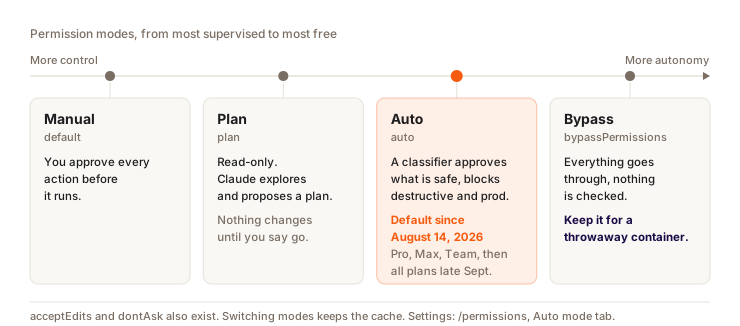
Plan mode is covered in detail in chapter 5. The docs list two other, less visible modes:
acceptEdits: Claude creates and modifies project files without asking, along with a few common file commands (mkdir,touch,mv,cp,rm,sed) in your working directory. All other commands still ask. Handy if you'd rather review the changes afterwards ingit diff.dontAsk: anything that would need a confirmation is refused outright. Only reads and what you've pre-approved go through. It doesn't show up inShift+Tab, you launch it withclaude --permission-mode dontAsk. It's built for CI and scripts, where nobody is there to answer.
Shift+Tab cycles through manual, accept edits, plan, then auto when available. Changing modes doesn't break the cache (the part of the conversation already processed, which the model reads back for almost nothing). The one exception: the opusplan model setting, which switches models when entering and leaving plan mode.
Auto mode
A permission mode where a second model, the classifier, reviews each of Claude's actions before it runs, in your place. Whatever stays within the scope of your request goes through, whatever is destructive, irreversible or aimed outside your environment is blocked. The result: you hardly click anymore.
Since August 14, 2026, it's the starting mode for new Pro, Max and Team sessions. Since late September 2026 (v2.1.283), the same goes for all plans and providers, for interactive sessions in the terminal and in VS Code, as long as you haven't set another mode yourself. It needs a recent model: Opus 4.6 or newer, Sonnet 4.6 or newer, Haiku 5.5, or a Fable model.
What it lets through, what it blocks
What goes through without bothering you: operations on files in your working directory, installing dependencies declared in your lock files, read-only HTTP requests, a push to a branch of the repo you're working in.
What's blocked by default, among other things: curl | bash, production deployments and migrations, force push, git reset --hard, terraform destroy, sending sensitive data outside, deleting files that existed before the session. claude auto-mode defaults shows the full list.
Your allow rules still apply before the classifier. Except those broad enough to run any code, like Bash(python:*): auto mode sets them aside while it's active.
When it blocks
A blocked action shows up in /permissions, in the Recently denied tab. Press r to retry it with your manual approval.
A "go ahead, I confirm" typed in the chat doesn't unblock anything. For the classifier to take your approval into account, your message has to name the exact action and its target: "force-push the feature/login branch" lifts the block, "you can force-push" doesn't. And that approval only covers that one action. Some rules never give way to a written approval (hard_deny, below).
If the classifier blocks 3 times in a row, or 20 times over the session, auto mode pauses and Claude Code starts asking you again. These thresholds can't be changed.
Tuning it
/permissions, Auto mode tab: to see and adjust what the classifier lets through, without opening a file. Changes are saved in~/.claude/settings.json.- The
autoModesection of~/.claude/settings.jsonaccepts three lists of rules written in plain language:allow(exceptions to permit),soft_deny(blocks that an explicit approval can lift) andhard_deny(absolute blocks). Always include"$defaults"in the list, otherwise you replace the built-in rules instead of adding to them. claude auto-mode critiquereviews your custom rules and flags the vague or redundant ones.claude auto-mode resetresets everything if you got lost.
{
  "autoMode": {
    "allow": [
      "$defaults",
      "Running Supabase migrations on the local database is allowed"
    ],
    "hard_deny": ["$defaults", "Never run supabase db reset"]
  }
}
The classifier doesn't read autoMode from project files (.claude/settings.json or .claude/settings.local.json). That's on purpose: otherwise a cloned repo could grant itself permissions. Same thing for the default mode: "defaultMode": "auto" only works in ~/.claude/settings.json.
{
  "permissions": {
    "defaultMode": "auto"
  }
}
Your CLAUDE.md, on the other hand, is read by the classifier. An instruction like "never force push" there steers both Claude and the classifier.
Auto mode doesn't replace your deny list. The classifier sometimes gets it wrong, in both directions. Keep your explicit bans (below): they apply whatever the mode.
Pre-approving safe commands
In manual mode, or so auto mode doesn't even have to think about it, list the repetitive, risk-free commands.
The shortcut: /fewer-permission-prompts
Run /fewer-permission-prompts. Claude goes through your past sessions, spots the read-only commands you approve all the time, and suggests an allowlist ranked by priority in the project's .claude/settings.json. You review it and approve.
By hand
Create .claude/settings.local.json at the root of your project (personal version, not shared with the team). It's also where Claude Code saves your "Yes, and don't ask again" answers:
{
  "permissions": {
    "allow": [
      "Bash(npm run *)",
      "Bash(npx supabase *)",
      "Bash(npx vitest *)",
      "Bash(git add *)",
      "Bash(git commit *)"
    ]
  }
}
Wildcard syntax: * is a wildcard. Bash(npm run *) allows npm run dev, npm run build, npm run test in a single rule. Keep the space before
the *: Bash(ls *) covers ls and ls -la, Bash(ls*) also covers
lsof.
| Command | Why it's safe |
|---|---|
npm run typecheck | Checks types, changes nothing |
npm run lint | Checks style, changes nothing |
npm run test | Runs the tests, changes nothing |
npm run build | Compiles the app, doesn't touch the source |
npx supabase | Local Supabase commands |
git add/commit | Local save (no push) |
No need to add git status, git diff or git log, nor ls, cat, grep: Claude Code recognizes them as read-only commands and runs them without asking, in every mode.
What still asks for confirmation in manual mode: git push, npm install, file deletions and any unknown command.
The deny list
The deny list blocks commands in every mode, even in bypass, even if Claude thinks it's necessary. Put it in ~/.claude/settings.json (global, for all your projects):
{
  "permissions": {
    "deny": [
      "Bash(rm -rf *)",
      "Bash(sudo *)",
      "Bash(supabase db reset *)",
      "Bash(git push --force *)",
      "Bash(git push -f *)",
      "Bash(git reset --hard *)",
      "Bash(git clean -f *)"
    ]
  }
}
rm -rf can delete your entire project. supabase db reset destroys local
data and credentials, and a git push --force can overwrite your team's work.
These lines cost nothing, and a single mistake avoided pays for them.
One limit to know about: a Bash rule matches the text of the command as Claude writes it. Bash(rm *) stops rm -rf build/, not /bin/rm -rf build/ or bash -c 'rm -rf build/'. It catches the common case, nothing more.
Allow vs deny:
- allow (the project's
.claude/settings.local.json): commands allowed without confirmation - deny (global
~/.claude/settings.json): commands banned everywhere, in every mode
Bypass
Bypass (launched with claude --dangerously-skip-permissions) removes almost every prompt. The deny list still blocks. A few cases still ask you: your ask rules, and a deletion aimed at / or your home folder (rm -rf ~).
Avoid it on your everyday machine. With auto mode, you already get most of the flow, plus a guardrail. Bypass is for a container or VM you can throw away if things go wrong.
Hooks 101
A shell command Claude Code runs on its own when a specific event happens:
before a tool, after an edit, when a session starts. You pick the event, you
write the command, and it runs every time. Unlike an instruction in
CLAUDE.md, Claude can't forget it.
The most useful events
| Event | When it fires | Example use |
|---|---|---|
PreToolUse | Before Claude uses a tool | Block a command before it runs |
PostToolUse | After a tool succeeded | Format a file after an Edit |
UserPromptSubmit | Every time you send a message | Add context to your request |
SessionStart | When a session starts or resumes | Load a notes index |
Stop | When Claude finishes its response | Play a sound, run the tests |
PreCompact | Before a context compaction | Save notes before the summary |
PreModelSwitch / PostModelSwitch | Before and after a model switch (the first one can block it) | Ask for confirmation, since switching models restarts without cache |
MessageDisplay | While one of Claude's responses is displayed | Mask an API key on screen (display only, not the history) |
DirectoryAdded | After an /add-dir mid-session | Install the added folder's dependencies |
These aren't all the events: the official hooks docs have the full list. A hook can also call an MCP tool directly (type mcp_tool) instead of a shell command.
Example 1: automatic Prettier after every Edit
Claude Code passes the hook the details of the action as JSON on standard input. For an Edit or a Write, the file's absolute path is in tool_input.file_path. Here, jq (install it if you don't have it) extracts it, then Prettier formats the file. The -I {} on xargs keeps the path intact if it contains spaces.
{
  "hooks": {
    "PostToolUse": [
      {
        "matcher": "Edit|Write",
        "hooks": [
          {
            "type": "command",
            "command": "jq -r '.tool_input.file_path' | xargs -I {} npx prettier --write {}"
          }
        ]
      }
    ]
  }
}
Example 2: load your personal index at startup
When each session starts, the hook prints your index file (notes, project rules), and Claude Code adds that text to the context. You no longer have to repeat the context.
{
  "hooks": {
    "SessionStart": [
      {
        "hooks": [
          {
            "type": "command",
            "command": "cat ~/Claude\\ OS/brain/INDEX.md"
          }
        ]
      }
    ]
  }
}
Watch the cost: everything this hook prints goes into the context of every session. A 30-line index, fine. A 2,000-line file, no. Chapter 19 explains why.
Where to put the config
~/.claude/settings.json: hooks applied to all your projects.claude/settings.jsonat the root of a project: hooks specific to that project (custom linter, team rules)
Security note: hooks run with your full system permissions. A script that
runs rm, sends a network request or reads sensitive files will execute
without asking you anything. Before copying a hook found on GitHub or a blog,
read every line. If you don't understand what it does, don't paste it.
Question
In auto mode, the classifier blocks a git push --force. You type “yes go ahead” in the chat. What happens?
Pick an answer to see the explanation.
Key takeaways
- Auto mode by default since August 14, 2026 (Pro, Max, Team), then on all plans in late September. To lift a block, name the action and its target.
autoModeanddefaultMode: "auto"only work in~/.claude/settings.json.- Your global deny list holds in every mode, bypass included: write it once. For the allowlist,
/fewer-permission-promptsworks from your real sessions. - Keep what a
SessionStarthook prints short, it goes into every session.
End-of-part quiz
Part 3: Advanced tools
6 questions. You pass the part with 5 correct answers or more.