A summary of your emails ready at 7 a.m., a PR review done before your coffee, without you sitting at the screen. This chapter covers the difference between a scheduled task and a routine, and which one to pick.
The idea
You describe a task once, with a schedule or a trigger, and Claude repeats it on its own, dropping the result where you work (Notion, Drive, a GitHub PR). You review it when you have time.
Anthropic offers two mechanisms with similar names. They don't live in the same place and they don't target the same people. The first one is in the Claude app, no code required. The second one is in Claude Code, for devs.
Who it's for
Entrepreneurs, freelancers and consultants who redo the same 10 minutes of copy-pasting every Monday. Morning news watch, inbox triage, weekly reporting, following up with prospects. On the dev side: PR reviews, issue cleanup, recurring checks on a repo.
Scheduled tasks in the Claude app
They come from Cowork, the agent mode of the Claude app, merged with chat on September 16, 2026 (see chapter 2).
- Plans: all paid plans.
- Where it runs: in Anthropic's cloud. Your computer can be off.
- What they use: your connectors.
- The catch: files on your computer, the built-in browser and computer use are only available when Claude Desktop is open. If your Mac is asleep, the task still runs, but without them.
The link that lets Claude read from or write to an outside tool: Gmail, Notion, Google Drive, GitHub. It's tied to your claude.ai account, so a task running in the cloud can use it without your computer being on.
How to go about it:
- Do the task once by hand in a conversation, until you like the result.
- Check that the connectors it needs are connected.
- Schedule it: frequency, time, and where to drop the result.
- Review the first three or four runs before you trust it.
Claude Code routines
Launched on April 14, 2026 as a research preview (a public trial version that may still change). Available on Pro, Max, Team and Enterprise.
A Claude Code session saved once (an instruction, one or more repos, connectors) that starts on its own in the cloud. It starts from a fresh copy of the repo on each run and runs without asking for permission. Whatever it does on GitHub or through your connectors shows up under your name.
There are three triggers:
| Trigger | Example |
|---|---|
| Schedule | Every day at 9 a.m. (at least 1 hour between two runs) |
| API call | Your script or your tool calls the routine |
| GitHub event | A pull request is opened on your repo |
There are two ways to create one. On the web: claude.ai/code/routines. In Claude Code, by describing what you want:
/schedule daily PR review at 9am
Each run counts against your subscription limits, like a normal session. The docs add hourly caps: 100 scheduled runs per hour on your account, and 30 manual or API runs per hour per routine. When you hit your subscription limit, the routine keeps going on your usage credits if they're turned on (claude.ai/settings/usage). Otherwise, the next runs are refused until your window resets (see chapter 11). The daily caps announced at launch in April (5, 15 or 25 per day) are no longer in the docs.
MCP servers you added on your machine with claude mcp add don't follow the
routine: it runs in the cloud, on a fresh copy of the repo. To use them, add
them as a connector on claude.ai, or declare them in a .mcp.json file
committed to the repo. And if the task needs your local files, create a local
scheduled task in the desktop app instead (Code tab, Routines, Local option):
it runs on your machine, as long as the app is open and the computer is on.
/loop: the loop inside your session
Don't confuse it with routines. /loop repeats a prompt at a regular interval inside an open Claude Code session. You close the session, the loop stops.
/loop 5m check the deployment
/loop check the deployment
With an interval, the pace is fixed. Without one, Claude picks the pace itself on each round (between 1 minute and 1 hour). A loop expires after 7 days, and a session accepts 50 tasks at most. Useful for watching a deployment or a CI run while you work on something else.
Which one to pick
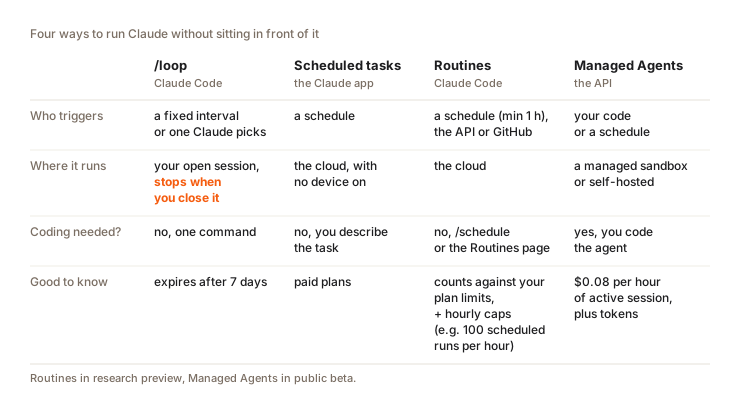
| Scheduled tasks (app) | Routines (Claude Code) | /loop | |
|---|---|---|---|
| For whom | Everyone, no code | Devs | Devs |
| Where it runs | Cloud | Cloud | Your open session |
| Triggers | Time of day | Schedule (1 hour minimum), API, GitHub | Interval or auto pace |
| Plans | All paid plans | Pro, Max, Team, Enterprise | Anywhere you have Claude Code |
| Limits | Your usual usage limits | Your limits + hourly caps | 7 days, 50 tasks per session |
| Tools | Your connectors | Whatever is reachable from the cloud | Everything your session sees |
Emails, docs, news watch: a scheduled task in the app. Code: a routine. /loop is just for keeping an eye on something while you work. And for custom logic or high volume, head to the API and the Agent SDK in chapter 10.
Three realistic examples
Every morning at 7 a.m. (scheduled task, Gmail and Notion connectors): "Summarize my unread emails from the last 12 hours, pull out the 3 priority actions for the day and put them in my Notion Daily page."
Every Friday at 2 p.m. (scheduled task, Notion connector): "Prepare a newsletter draft from my Notion notes tagged #newsletter this week. Don't publish anything, leave the draft in my Newsletter page."
For quotes with no reply (scheduled task every morning at 8 a.m., Gmail and Notion): "List the emails from the last 24 hours that mention a quote and that I haven't answered. Add them to my Notion Sales database with a follow-up date 2 days out."
The third one replaces an idea you see a lot: "when I get an email, do X". There's no "email received" trigger. You use a schedule that scans the inbox instead.
For a dev, the routine equivalent: every time a pull request is opened on your site's repo, Claude reviews the diff and leaves its notes as a comment. You merge it yourself.
Safety
Never set up a routine that sends something to the outside world without a review. Claude drafts, you send. A follow-up email that goes out on its own to a prospect with made-up information is a lost client.
Have every scheduled task drop its output in a space that's yours (your Notion, your Drive, your Gmail drafts) before anything goes to an outside recipient. Without that safeguard, mistakes pile up without you seeing them, and you find out the day a client sends them back to you.
What it costs
Each run uses your quota like a normal conversation. A daily routine means 30 sessions a month. Badly scoped (vague instruction, connectors it doesn't need, a big model for a simple task), it weighs heavily on your limits without you noticing.
Before you schedule anything, tighten the instruction, ask for a short output and pick a model that fits. The details on limits and how to save are in chapter 11.
Question
Goal: a review of your repo's pull requests every morning at 8 a.m., with your laptop off, for months. Which tool?
Pick an answer to see the explanation.
Key takeaways
- With no code, scheduled tasks in the app run in the cloud, on all paid plans.
- A Claude Code routine starts from a schedule, an API call or a GitHub event. Each run draws on your subscription limits.
/loopstops when you close your session.- There's no "email received" trigger: a schedule that scans does the same job.
- Nothing goes out to a client without your review.