A mockup or a landing page without opening Figma: Claude Design does it from any conversation. This chapter also says when Canva or Figma do better. Were you using claude.ai/design? Migrate before December 14.
You describe a mockup, a clickable prototype or a landing page, and Claude draws it on a canvas next to the conversation. It also does one-pagers and decks. Once the first version is out, you make changes by voice, by typing, or right on the canvas.
Since October 8, 2026, Design is out of beta and included in every plan, Free included.
Where it comes from
The product has moved a lot in six months. If you read a tutorial in the spring, a good part of it is out of date.
| Date | What changes |
|---|---|
| April 17, 2026 | Launched as a research preview from Anthropic Labs (the team that ships Anthropic's experimental products), for Pro, Max, Team and Enterprise. Runs on Opus 4.7. Separate site: claude.ai/design. |
| June 17, 2026 | Design system import rebuilt (GitHub repo, design files, uploads). Admin role that can lock a standard system. Canvas editor: drag, resize, align. Design now shares the usage limits of the rest of Claude, instead of a separate weekly quota. First exports to Adobe, Base44, Canva, Gamma, Lovable, Miro, Replit, Vercel and Wix. |
| September 16, 2026 | Design works in any conversation, in the Artifacts tab and in Claude Code with /design. Decks move to their own template: Claude Slides. |
| October 8, 2026 | End of beta. Design, Slides and Docs come to every plan, Free included. Motion launches in beta. |
| October 15, 2026 | On by default on Enterprise (before that date, the owner turns it on in Organization settings > Artifacts). |
| December 14, 2026 | The standalone claude.ai/design site shuts down. |
Were you using claude.ai/design? Migrate before December 14
Your design systems don't move into Claude on their own. A single migration brings over the ones for your whole organization, and anyone with access to Design can run it.
- Open the Artifacts page in Claude.
- Click "Migrate team design systems" in the "Claude Design lives here now" banner. If you closed it, the option is in the Claude Design menu at the top right.
- Confirm with "Migrate". On an individual plan, the migration starts right away.
- Check the "Migrated" list. Anything that failed shows up under "Couldn't be migrated", with the reason (often: too large).
Two cases never go through: empty design systems, and those that started from a built-in starter theme, even if you edited them.
Your projects stay on the standalone site until it shuts down. To keep a copy, open them one by one: Share, then "Project HTML", "Project archive" and Export. You get a .zip, and it doesn't count against your limits.
Chats with Claude and comments from the standalone site aren't migrated. They disappear in December 2026, and public links to your projects stop working. Save what you need before then.
What you do with it
Design is an artifact template (chapter 4): everything you create lands in the Artifacts tab.
What comes out well:
- Interactive prototypes, to get a user flow tested without writing code.
- Landing pages and full websites.
- A one-pager pulled from a sales proposal.
- App mockups: a 4-screen onboarding, a dashboard with filters.
- Marketing visuals that follow your brand guidelines.
- Three directions for the same screen, when you don't know yet what you want.
For decks, Claude switches to the Slides template (chapter 4). Same family, with your design system applied.
The design system
Your colors, fonts and components (buttons, cards, forms) stored in one place, with the rules for using them. Claude builds with these pieces instead of inventing a new style for each project.
You import it once from a GitHub repo, design files or uploads. After that, every new project inherits it. Claude checks on its own that its output matches the system and fixes things before showing you the result.
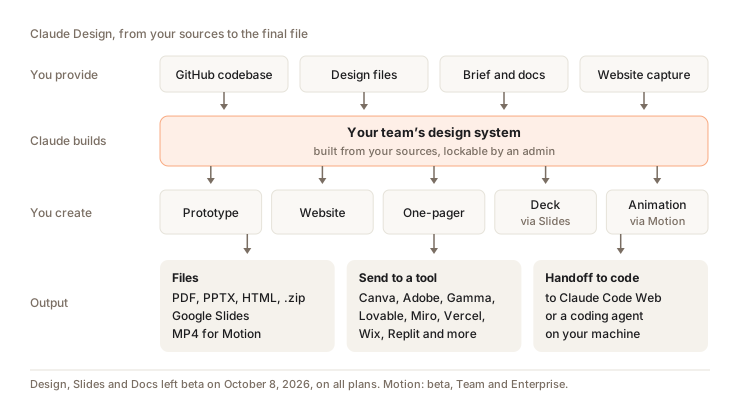
On Team and Enterprise, an owner can set a default design system for the whole organization, and an admin role can lock a standard system so nobody changes it.
How to start
- In a conversation, ask for a design: "Make a one-pager from this proposal". Or pick Output > Design in the message box. Or open the Artifacts tab and choose a Design template.
- Attach the design system to use. If it lives in a React repo,
/design-syncin Claude Code converts it and sends it to Design. The first sync checks every component and can take a few hours on a large repo. - Add context: screenshots, a deck whose style you like, a repo.
- Describe the goal, the layout, the content and the target audience.
- Iterate: the chat for structure, a comment pinned on an element for a targeted fix. To move, resize or align, edit directly on the canvas.
- Export or share.
Example of a prompt that works: "Create a monthly revenue dashboard with filters by region and product line. It has to work on mobile." The more precise you are, the less you iterate.
What it looks like in real life
I rebuilt my website with Claude Design in 2 hours. And I burned through 51% of my Max plan doing it. Keep that number in mind before you start a big project.
Export, send, hand off
Export button at the top right:
| Format | What for |
|---|---|
| .zip | Get all the project files |
| Send by email, print | |
| PPTX | The client wants PowerPoint |
| Google Slides | Keep editing in Google |
| Standalone HTML | A page that opens in any browser |
You can also send your design to a third-party tool: Adobe (Express, Experience Manager, Journey Optimizer), Base44, Canva, Gamma, HubSpot, Hyperframes, Lovable, Miro, Netlify, Replit, v0, Vercel and Wix.
Handoff to Claude Code. When a design needs to become a real product, you send it to your local coding agent or to Claude Code on the web. Claude Code picks up your work as is. The other way around, /design in Claude Code imports a design into your codebase or turns your code into a live prototype.
Sharing. A design starts private. You choose who can view, comment on or edit it. On Team and Enterprise, sharing stays internal to the organization by default.
Motion: coded animations
Motion turns your content into a short animation, like a 30-second explainer for a team meeting or an animated chart to show the board. It also works for a product demo meant for client onboarding.
Motion doesn't use a video generation model. Claude writes code that animates your text, charts, shapes and images. So no filmed footage, and no generated people. The upside is that you change a word, a number or a timing without the rest moving.
Who has access. Beta since October 8, 2026, on Team and Enterprise only. On by default on Team. On Enterprise, the owner turns it on in Organization settings > Artifacts. No Motion on Free, Pro or Max for now.
How to do it.
- Ask for an animation in a chat ("Turn this quarterly report into a 30-second explainer for the all-hands"), or pick Output > Motion.
- Say who will watch it, where it will be shown and roughly how long it should be.
- Attach your data, your report or your images, so the animation starts from your content.
- Make changes in the chat ("Slow down the second scene") or directly in the editor.
- Export to MP4.
To go further, you open the animation in Adobe, Descript, HeyGen, Higgsfield, invideo, Luma AI or Runway. Canva and Captions are announced.
On Pro or Max, without Motion: you can hand off to Claude Code and render the animation in code, with a tool like Hyperframes (which is also in Design's list of export targets).
Design, Slides, Canva or Figma
| What you need | Pick |
|---|---|
| A deck from your notes, to present on Monday | Claude Slides (chapter 4) |
| Explore three directions for a landing page, a clickable prototype, an app mockup | Claude Design |
| A social visual or a flyer to touch up by hand in your brand templates | Canva, or start in Design and send to Canva |
| A product with a designer in the loop, several people on the same file for months | Figma |
My take: Design gets a clean first version out fast, and it's handy for comparing options. It's less comfortable with a file several people rework for months. Anthropic says so itself: simultaneous multi-person editing is still basic, and there's no version history yet. For that kind of work, Figma keeps the edge.
The traps
- It uses a lot. My website redesign, above, gives you the order of magnitude. Large repo, many iterations: the bill climbs fast.
- Audio isn't documented. Anthropic's help center never mentions reading a sound file. To sync an animation to a voice, provide a timestamped transcript.
- Large repo, slow browser. For a very large repo, Anthropic recommends linking it from Claude Code (
/design-sync) rather than in the browser. - No version history. Before heading in another direction, tell Claude: "Save what we have and try a completely different approach."
- Comments that vanish. If Claude ignores a comment pinned on the canvas, paste the feedback into the chat. That's the official workaround.
- The design system reflects its source. A messy codebase gives messy output.
- On mobile, you can edit a design since October 8, 2026, but not change its sharing settings.
How much it costs
No separate price. Design and Motion count against your plan's limits, the same ones as chat and Claude Code: a session that resets every 5 hours plus a weekly limit. Anthropic doesn't publish any numbers.
When you hit the limit, Design is unavailable until the reset. If you turned on usage credits (paying at API rates beyond your plan), you keep going. How to read your usage and save on it: chapter 11.
Question
Two design systems and about ten projects are sitting on claude.ai/design. You run “Migrate team design systems”. What moves into Claude?
Pick an answer to see the explanation.
Key takeaways
- Since October 8, 2026, Design is open on every plan, from any conversation, the Artifacts tab or
/designin Claude Code. - claude.ai/design shuts down on December 14, 2026: migrate your design systems and save your chats before then.
- Motion (Team and Enterprise) produces coded animations as MP4.
- Figma is still a better fit for a file several people rework for months.
- Design uses up your limits fast. Save it for projects that deserve it.