The app you'll open every day. We look at how it picks between a quick answer and a long task, then which model to set and which plan to get.
Who it's for
Anyone who wants a work AI within reach. You ask a question, Claude answers. You hand it a two-hour task, it does it while you work on something else.
You don't need to be a developer. The free plan is enough to start tonight, on claude.ai in your browser, in the desktop app (Mac, Windows) or in the mobile app (iOS, Android). Same account, same history everywhere.
Before and after September 16, 2026
Since September 16, 2026, chat and Cowork (the mode where Claude ran long tasks) are a single app.
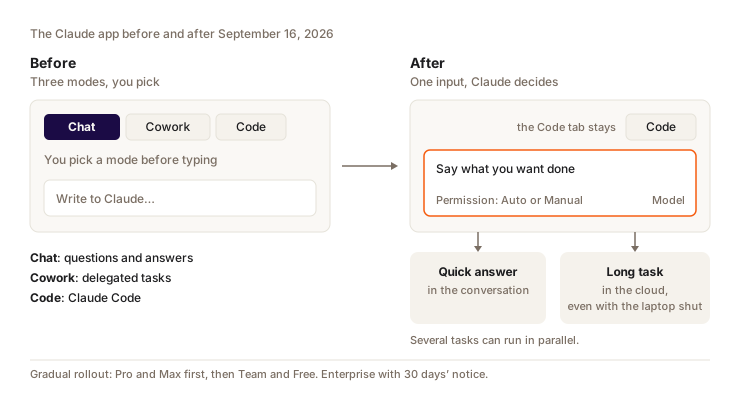
If you still see a Chat/Cowork switch, your account hasn't moved over yet. The model picker and the "Code" tab (Claude Code, chapter 6) stay where they were. A few settings moved:
| You're looking for | Where it is now |
|---|---|
| The web search button | It's gone. Claude searches the web when it helps |
| Deep research with sources | /deep-research, or the "+" button under the input, then Research |
| Cowork's global instructions | Settings > General, "Instructions for Claude" field |
| Your old Cowork tasks | In Recents, mixed in with your conversations |
| Files Claude created | Next to the conversation |
The vocabulary is still a bit loose. Anthropic's help center says "Claude Cowork is now just Claude", but the pricing page and the Team/Enterprise docs still talk about "Claude Cowork" as a feature. When you read Cowork somewhere, take it to mean: Claude's ability to run a long task.
How it works
- You type your request in the single input. Say what result you expect and in what format ("a spreadsheet with one tab per region"), and Claude sizes it up better.
- Claude sizes up the request. A simple question, it answers right away. To read files, search, use your tools and produce a deliverable, it starts a long task.
- You set the permission in the message box. Manual (the default): you stay in control of its actions. Auto: an automatic safety check runs before each action, without asking you.
- Several tasks can run in parallel. They run in the cloud (on Anthropic's servers) and keep going when you close your laptop.
- You get files back. Documents, spreadsheets with working formulas, PowerPoint decks (PPTX).
Example: a delegated task
You drop September's 14 supplier invoices into the conversation, as PDFs. You type:
Make me a spreadsheet with one row per invoice: date, supplier,
amount before tax, VAT, total. Add a total per supplier with formulas,
and flag duplicates or amounts that don't add up.
Claude understands this isn't a two-line answer. It reads the PDFs one by one, builds the spreadsheet, checks its totals and hands you an Excel file. Meanwhile, you ask a quick question in another conversation, or you close your laptop. The task keeps running in the cloud.
Still, check the result. A crooked scan can produce a wrong amount, and Claude doesn't always know.
Available models
The four October 2026 models are introduced in chapter 1. What changes from one plan to another:
| Plan | Models in the picker |
|---|---|
| Free | Sonnet and Haiku. No Opus, no Fable |
| Pro | Opus, Sonnet and Haiku. Fable only through usage credits |
| Max 5x and 20x | All of them. Fable capped at 50% of weekly limits, with its own weekly limit |
| Team | Opus, Sonnet and Haiku. Fable on Premium seats, capped at 50% of weekly limits |
| Enterprise | All of them, Fable included |
This is what the pricing page showed in October 2026. It lists families (Opus, Sonnet, Haiku), not version numbers: Anthropic doesn't say which version runs by default on each plan. Usage credits are pay-as-you-go at API rates, covered further down.
You switch models from the picker in the conversation. On some sensitive topics (biology, cyberattacks), Fable automatically falls back to Opus. You can turn this fallback off in Settings > Capabilities.
Effort
How much time Claude gives itself to think before answering. More effort gives better answers on a hard problem, but it's slower and uses up your limits faster.
The setting has been in claude.ai since May 28, 2026, on every plan. Five levels: low, medium, high, extra, max. Since September 1, 2026, the default level is medium.
A good habit: low for a factual question or a rewording, medium for everyday work, high and above when Claude gets stuck on a problem.
Context
Everything Claude has in front of it in a conversation: your messages, its answers, the files. It's measured in tokens (pieces of words) and its size is capped. Past the cap, Claude can no longer see the beginning.
On paid plans, the size depends on the model:
| Context size | Models |
|---|---|
| 1 million tokens | Fable 5.1, Opus 5.5, Opus 5, Sonnet 5.5, Sonnet 5, Haiku 5.5 |
| 500,000 tokens | Fable 5, Opus 4.x, Sonnet 4.6 |
| 200,000 tokens | All the others |
A million tokens is several books. You can drop in a full report or a long transcript and keep talking about it.
Plans and pricing
| Plan | Price | For whom |
|---|---|---|
| Free | $0 | Trying it out, light use |
| Pro | $20/month, or $17/month billed yearly | Daily use. Includes Claude Code |
| Max 5x | $100/month | You work with Claude all day |
| Max 20x | $200/month | Heavy use, long tasks back to back |
| Team | Standard seat $20 (yearly) or $25 (monthly). Premium seat $100 or $125. From 2 to 150 seats | Teams |
| Enterprise | $20 per seat per month self-serve, plus usage at API rates | Large organizations |
How limits work:
- A session limit that resets every 5 hours, plus a weekly limit across all models.
- These limits are shared across claude.ai, Claude Code, the desktop app and Claude Design.
- Anthropic doesn't publish any numbers. On September 22, 2026, the 5-hour limits went up on Pro, Max, Team and Enterprise, with no figure given.
- On Pro and Max, usage credits take over when you hit the limit: you pay at API rates, with a monthly cap and auto-reload.
What still gets in the way
The merge left a few gaps:
- Conversation branches no longer exist in the new interface, and neither does "Add from GitHub".
- Incognito mode opens the old interface: Claude doesn't create files or run code there.
- History search doesn't cover old Cowork tasks. Find them by name in Recents.
- Dispatch (starting a task on your computer from your phone) is closed to new users.
- Local files, the built-in browser and computer use (beta, Pro and Max) only work while the Claude Desktop app is open.
- Since October 6, 2026, on Pro and Max, all new tasks run in the cloud. The "Only on your computer" option is gone. For fully local work, you have to use Claude Code desktop.
The Chat/Cowork switch isn't coming back.
When to use it vs something else
Use the Claude app to think, write, search, ask questions about a document, and hand off time-consuming office tasks.
As soon as you're working on code, or you want everything to stay on your machine, move to Claude Code (chapter 6). For a task that should come back every Monday without you, look at routines (chapter 9). Voice mode and mobile are in chapter 8.
A long task uses far more than a question, and Opus or Fable drain your limits faster than Sonnet or Haiku. So does high effort. Save the big models for work that deserves them, and read chapter 11 to track your usage.
Question
The web search button is gone from your screen. How does Claude check something online now?
Pick an answer to see the explanation.
Key takeaways
- Since September 16, 2026, chat and Cowork are one app with a single input. Claude picks between a quick answer and a long task.
- Check the files that cloud tasks hand back before you send them.
- Free gives you Sonnet and Haiku, Pro adds Opus. Fable goes through credits on Pro and stays capped on Max.
- Effort is on medium by default: lower it for simple questions.
- No usage numbers are published, so watch your usage instead of guessing.