Cowork, Design, Claude Code, Managed Agents: you've lost track of what's what. Five minutes to sort it out and find the chapter you need.
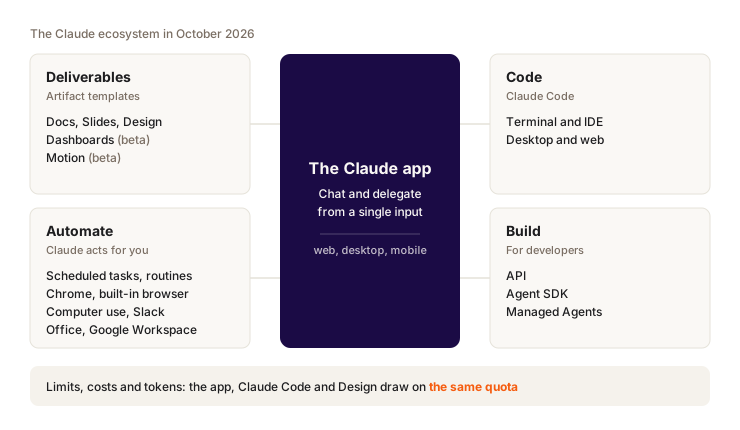
Anthropic in 2 sentences
Anthropic is a San Francisco startup founded by former OpenAI people, with a mission to build AI that is safe and useful. Claude is the name of its AI models, and also of the apps that run them (web, desktop, mobile, terminal).
The models in one minute
In October 2026, the current lineup has four models. You pick one from a menu, Claude does the rest.
| Model | In short | Released |
|---|---|---|
| Fable 5.1 | The top of the range, and the most expensive. For the hardest problems. | September 1, 2026 |
| Opus 5.5 | Heavy reasoning, long tasks. Default model in Claude Code. | September 22, 2026 |
| Sonnet 5.5 | The everyday balance. | September 28, 2026 |
| Haiku 5.5 | Fast and cheap, for short answers and high volume. | October 7, 2026 |
Which model on which plan, and how to set the effort: chapter 2.
What changed on September 16, 2026
Until September 16, 2026, there were two ways to use Claude. Chat, to talk. And Cowork, a separate mode where Claude ran long tasks (reading files, using your apps, producing a deliverable) while you did something else.
Since September 16, 2026, chat and Cowork are one and the same. One input box. Claude decides on its own whether your request calls for a quick answer or a long task. The rollout takes several weeks: Pro and Max first, then Team and Free, and Enterprise with 30 days' notice. If you still see a Chat/Cowork switch, your account hasn't moved over yet. Deliverables changed shape too: they all go through artifacts now.
Something Claude builds next to the conversation: a document, a deck, a page, a dashboard. You edit it, share it, export it. Each type of artifact starts from a template (a starting model): Docs for text, Slides for a deck, and so on.
So Docs, Slides, Design, Dashboards and Motion are now artifact templates. Since October 8, 2026, Docs, Slides and Design are out of beta on every plan, Free included. Dashboards and Motion are still in beta.
Which chapter for which need
| You want to... | What you use | Chapters |
|---|---|---|
| Chat, search, hand off a task | The Claude app (web, desktop, mobile) | 2 and 3 |
| Produce a document, a deck, a visual, an animation | Artifacts: Docs, Slides, Design, Motion, Dashboards | 4 and 5 |
| Code on a real project | Claude Code | 6 |
| Have Claude act on your computer, browser and apps | Desktop, built-in browser, Claude in Chrome, mobile, Office, Google Workspace, Slack | 7 and 8 |
| Run a task without you | Routines and scheduled tasks | 9 |
| Build your own product with Claude | API, Agent SDK, Managed Agents | 10 |
| Know what you use and avoid burning through your limits | Limits, credits, tokens | 11 |
The unit of text a model reads and writes. A common word is often one token, a long or rare word takes several. Your usage is counted in tokens, and you'll see the word throughout this guide.
On limits, your subscription is a single pool. Usage limits are shared across claude.ai, Claude Code, the desktop app and Claude Design. Anthropic doesn't publish any numbers per plan. Chapter 11 explains how to read your usage and bring it down.
Plans at a glance
Free at $0, Pro at $20/month, Max at $100 or $200/month, plus Team and Enterprise offers. The details (included models, limits, credits) are in chapter 2.
How to read this guide
Each chapter answers the same questions:
- Who it's built for.
- What you can do with it, with a real example.
- How much it costs and on which plan.
- When to use it instead of another Claude tool.
- What still gets in the way, and how it affects your usage.
In which order to read
| Your profile | Suggested path |
|---|---|
| You're just starting | 2, 3, 4, then 11 before you spend whole days in it |
| You produce deliverables for clients | 2, 3, 4, 5 |
| You code or want to start | 2, 6, then the Claude Code guide, then 11 |
| You want to automate your day | 2, 7, 8, 9 |
| You're building a product | 10, then 11 |
Only one chapter to start with? Chapter 2. It covers the app you'll open every day.
Key takeaways
- The Claude app sits in the middle, with four areas around it: deliverables, code, automation and building products.
- Docs, Slides, Design, Dashboards and Motion are artifact templates.
- Fable 5.1, Opus 5.5, Sonnet 5.5 and Haiku 5.5 make up the October 2026 lineup.
- Before you launch heavy tasks, read chapter 11: every app draws on the same limits.