The 12 mistakes that cost beginners the most, including the one that quietly drains your limit. All of them come from real sessions.
Mistake 1, not creating a CLAUDE.md
What happens: every session starts from scratch. One day files go into src/components/, the next day somewhere else, and the business rules you explained yesterday are gone.
What to do: create the CLAUDE.md in the first hour of the project (see chapter 3). You stop repeating your conventions every session.
Warning sign: if you keep repeating "use the project palette" or "files go
in src/components/", your CLAUDE.md is incomplete.
Mistake 2, asking for everything at once
"Build me a complete project management app with auth, dashboard, billing, analytics and an AI assistant": Claude will do it, but only on the surface, with shortcuts everywhere and code nobody will be able to maintain. Split it into features instead, one at a time, with a plan for each. You only move on to the next one once the previous one is shipped, tested and committed.
Rule: if your request contains more than 3 "and"s, it's too big. Split it.
Mistake 3, rushing in without a plan
What happens: Claude makes technical choices without asking you. After 30 minutes of code you find out it took the wrong approach. Everything has to be redone.
What to do: 10 minutes of brainstorm + plan save you 2 hours of rework. See chapter 5.
Exception: simple bug fixes and cosmetic tweaks don't need a plan.
Mistake 4, blindly accepting the result
What happens: Claude can make subtle mistakes: an inverted condition, an unhandled edge case, a security issue. Without testing, these bugs reach production.
What to do: always test visually on localhost. Only you know whether the UX matches what you had in mind. Claude can't see your screen.
At a minimum, check that:
- The normal behavior works
- Error cases are handled (bad input, empty data)
- Responsive (mobile) works
- The copy is correct (spelling, grammar)
Mistake 5, not iterating
The first draft "that works" is rarely the one you want to show your users. It sets up the structure, and that's it. Two or three targeted rounds are usually enough to get to a clean result, for example:
- "Increase the spacing, it's too cramped"
- "Add an animation while the data loads"
- "The error message is too technical, rewrite it for a non-developer"
Mistake 6, skipping checks
What happens: you pile up invisible errors that blow up later. A wrong type here, a broken import there, and suddenly your build fails with 47 errors.
What to do: run typecheck + lint after every change. Non-negotiable. An error caught right away takes one line to fix.
Tip: in auto mode, or with a well-configured allowlist (see chapter 9), Claude runs these checks without asking you.
Mistake 7, writing vague prompts
A vague prompt gives you a random result, and you go through 3 or 4 rounds to get what you had in mind. The recipe from chapter 4 fits on one line: context + what + criteria + constraints. 30 seconds of wording saves you 10 minutes of corrections.
Mistake 8, not saving memory
The next day, Claude suggests the approach you ruled out the day before and repeats a mistake you already fixed. Auto memory is on by default, but it doesn't keep everything. At the end of a productive session, say "Update the project memory.", and go through /memory from time to time to fix what's wrong. Details in chapter 10.
Mistake 9, doing everything in sequence
What happens: you waste time waiting for each task to finish when some of them could run in parallel.
What to do: identify the independent tasks and say so explicitly.
"Run in parallel: the SQL migration, the UI component and the unit tests. These 3 tasks are independent."
Claude launches 3 subagents in the background instead of doing them one after the other. You save time, but your usage doesn't go down: each subagent starts from its own context, without your conversation's cache (see chapter 7).
When not to parallelize: when one task depends on another one's result (e.g. the TypeScript types depend on the SQL migration).
Mistake 10, ignoring context management
What happens: you chain three features in the same conversation. The context (everything Claude holds in working memory for this conversation) fills up with files it read, logs, abandoned leads. Claude starts forgetting your conventions and repeating mistakes you already fixed. You lose 20 minutes before realizing the problem is the context.
What to do: keep an eye on the context (with /context or the status line). /compact at the end of a work phase, /clear when you change topics (it's free). And if Claude goes off the rails, /rewind (Esc Esc) instead of trying to fix things in the same polluted context. Current models have 1 million tokens of context. Claude still often starts drifting well before that limit.
Warning sign: Claude starts "forgetting" rules it followed at the start of the session. That's your signal to compact.
Mistake 11, never running /code-review
What happens: the code runs, so you commit. Without a review you let through security holes (exposed user data), unhandled edge cases (what happens if the list is empty?), and dead code that weighs the app down.
What to do: run /code-review before every significant commit (/review still works, it's an alias). The review runs in a subagent that didn't write the code: like a colleague reading over your work, it catches what the author no longer sees. Raise the level (/code-review high) on anything touching auth or payments, and add /security-review on top.
Real example: on Panettone, a review caught that sensitive data was being logged to the console. Without the review, that data would have been visible in production.
Mistake 12, switching models or coming back cold to a long session without realizing it
What happens: your limit drains faster than expected and you don't understand why. Claude Code caches the start of your conversation: system prompt, CLAUDE.md, memory, earlier exchanges.
With every message, Claude Code sends the whole conversation back to the model. The cache avoids reprocessing everything: if the start of the request is identical, character for character, to what the model just processed, that start is reread for a fraction of the price ($0.20 per million tokens on Opus 5.5, versus $4 without cache). Change a single thing in that start, and everything after it is reprocessed at full price.
In my sessions, almost all of the input is read from cache (the numbers are in chapter 19). Two harmless-looking moves break it:
- Switching models mid-session. Each model has its own cache. Going from Opus 5.5 to Sonnet 5.5 on a 100,000-token conversation to "save money": the next turn rewrites the whole cache, about $0.25 at API rates, instead of $0.02 to reread it on Opus. The savings only show up after several turns. Same effect with
opusplan(which switches between Opus and Sonnet when you enter and leave plan mode) or a skill that forces its ownmodel:. - Picking a big session back up after a break. The cache expires after 1 hour for the main conversation on a subscription, and after 5 minutes with an API key or usage credits. When you come back, the first message reprocesses everything.
These two are the most common. There are others:
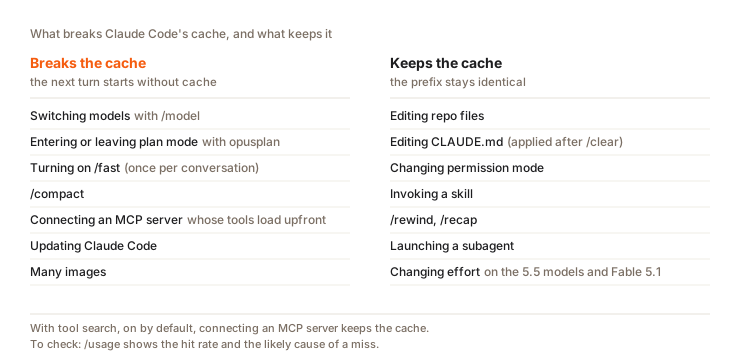
The order of magnitude, at Opus 5.5 API prices, for a 300,000-token session: about $0.06 to reread it from cache. Reprocessing it cold costs about $1.50 with a 5-minute cache and $2.40 with a 1-hour cache (writing a long-lived cache costs more). For me, cold restarts happen far more often than model switches.
What to do:
- Pick your model at the start of the session and stick with it. For a simple task, launch a haiku subagent rather than switching your whole conversation.
- To spend less, lower the effort with
/effort: on the 5.5 models and Fable 5.1, it doesn't break the cache. - After a long break on a big session,
/clearplus a summary beats a cold restart. On Pro and Max, Claude Code offers to start again from a summary: accept. - Check with
/usage: the cache line shows the cache read rate and the likely cause of a miss.
Warning sign: /usage shows a cold cache even though you didn't do
anything special. Look for the model switch or the break. Chapter
19 covers the whole
mechanism.
Question
A 200,000-token session on Opus 5.5, Pro plan. You want the rest of it to cost less. Which move keeps the cache?
Pick an answer to see the explanation.
Key takeaways
- The first 11 mistakes are ranked by impact. Fix them in that order.
- The
CLAUDE.mdis the most critical. Context management and review are the most underrated. - The 12th quietly empties your limit. The fix: one model per session, and never a cold restart of a big conversation.
End-of-part quiz
Part 4: Putting it into practice
6 questions. You pass the part with 5 correct answers or more.