/commit isn't a built-in command, despite what plenty of tutorials suggest.
Here are the ones that ship with Claude Code in October 2026, the ones that
come from elsewhere, and how to write your own in 30 seconds.
What's a slash command?
A shortcut that triggers a specific behavior. You type /name, Claude runs it without you having to write a long prompt. Type / on its own in Claude Code to see the list of what's available on your setup.
There are four families, and a lot of tutorials mix them up:
| Family | Where it comes from | Examples |
|---|---|---|
| Built-in | Part of the Claude Code program itself | /clear, /model, /usage, /rewind |
| Bundled skills | Skills (packaged prompts) that ship with Claude Code. They use up one Claude turn | /code-review, /simplify, /loop, /doctor |
| Plugins | Installed from a marketplace with /plugin | /commit (commit-commands plugin) |
| Custom | A markdown file you wrote | Your /front, your /deploy-check |
For the user, they're all typed the same way. The difference matters when a command "disappears": a plugin command only exists if the plugin is installed, a custom command only if the file is there.
A special case since October 2026: a command added by a mod, a plugin that contains code. It runs that code right away, with no Claude turn, so it spends no tokens on the answer. Chapter 20 shows one, /conso.
Session and context
Context is everything Claude holds in working memory for the current conversation. These commands control it.
| Command | What it does | When to use it |
|---|---|---|
/clear | Starts over with an empty conversation (aliases /new, /reset). Free, resets the /usage counter to zero | You're switching topics (bug fix to new feature) |
/compact [instructions] | Summarizes the conversation to free up context | End of a work phase, or when Claude starts forgetting rules |
/autocompact | Sets the auto-compaction threshold for the current model (auto or a size, for example 500k) | You want to compact earlier than the default (around 967K tokens on a 1M model) |
/context | Shows what's filling your context, with suggestions | You want to know where your tokens are going |
/recap | Summarizes the session in one line, without breaking the cache | You're back from a break and lost the thread |
/btw [question] | Asks a side question without adding it to the conversation | A quick question that isn't worth polluting the context |
/rename | Names the session | Before a /clear, so you can find it in /resume |
/resume | Picks up a previous session (alias /continue) | You're resuming a task interrupted the day before |
/rewind (or Esc Esc) | Goes back to an earlier point, code and conversation, or summarizes from a chosen message | Claude is heading down the wrong path. The sooner you rewind, the better |
/branch [name] | Creates a branch of the conversation at this point and switches you to it. The original stays available in /resume | Trying another direction without losing the conversation as it stands |
/fork [prompt] | Copies the conversation into a background session, which creates its own worktree before changing any code | Moving a side track forward while you keep going here |
Model, effort and consumption
| Command | What it does | When to use it |
|---|---|---|
/model | Switches model (Opus 5.5 by default, Fable 5.1, Sonnet 5.5, Haiku 5.5) and saves it as the default for future sessions | At the start of a session. Mid-session, it restarts without cache |
/effort | Sets the effort: low, medium (default on 5.5 models), high, xhigh, max (for the session only) or auto | low for mechanical work, high or xhigh for a nasty bug |
/fast | Same Opus model, up to 2.5 times faster, but more expensive (at API rates, $8/$40 per million tokens on Opus 5.5) | Fast iterations when you're in a hurry and the budget allows |
/usage | Estimated session cost, plan limits and a cache line. On a paid plan, breakdown by skill, subagent, plugin and MCP server | At the end of a session, or when your limit is getting close |
/usage-credits | Manages usage credits (the old "extra usage", formerly /extra-usage) that take over once you hit your plan limit | You've hit your limit and want to keep going |
/cost and /stats still exist, they're aliases of /usage. /fast only works on Opus (5.5, 5 and 4.8).
How much thinking the model allows itself before answering. The higher it is, the slower and more expensive, because that thinking is billed as output text. On Opus 5.5, Sonnet 5.5, Haiku 5.5 and Fable 5.1, changing effort mid-session keeps the cache: it's the first setting to touch if you want to spend less. Chapter 19 details what each setting costs.
Autonomy
| Command | What it does | When to use it |
|---|---|---|
/plan [description] | Switches to plan mode: Claude explores and proposes a plan before acting. With a description, it starts on the task right away | Non-trivial task, 3 or more steps, architecture choices |
/goal <condition> | Claude keeps taking turns until the condition is met. /goal clear to stop | "All tests pass", "the build is green" |
/loop [interval] [prompt] | Reruns a prompt as long as the session stays open. Without an interval, Claude picks its own pace. Expires after 7 days | Watching a deployment, polling a build, following a PR |
/schedule | Creates a routine (alias /routines): an agent that runs in the cloud on a schedule | PR review every morning at 9 a.m., even with your computer off |
/workflows | Opens the workflow tracking view (dozens of subagents in the background): follow, pause, resume, save | Following a big job running in the background |
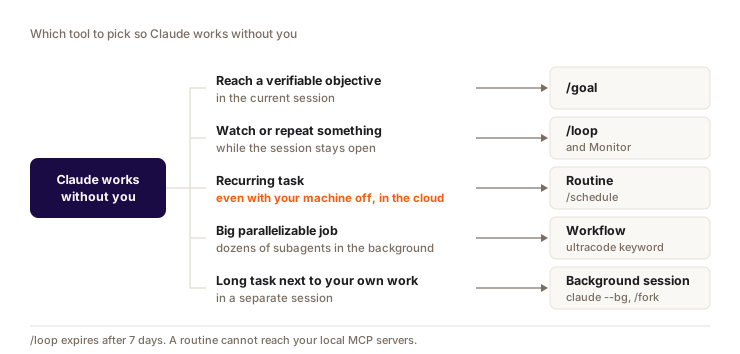
All of this is covered in detail in chapter 18.
Review and quality
| Command | What it does | When to use it |
|---|---|---|
/code-review [level] | Reviews your diff (or a PR, a branch, a folder) and looks for bugs. Levels low to max. --fix applies the fixes, --comment posts on the PR | Before every important commit |
/code-review ultra | Multi-agent review in the cloud. 3 free reviews on Pro and Max, then $5 to $25 of usage credits per review depending on size | Big PR before going to production |
/simplify | Cleans up the changed code (reuse, simplification, efficiency) and applies it. Doesn't look for bugs | After a feature, before the review |
/security-review | Security audit of the diff between your branch and the default branch of the origin remote | Anything touching auth, payments, personal data |
/fewer-permission-prompts | Analyzes your past sessions and suggests a list of commands to allow | You click "Yes" too often |
/skill-doctor | Shows what each skill costs in context and how often it's used. The report opens in the Stats tab of /plugin | You've installed a lot of skills and want to clean up |
/doctor | Checks your install, settings, extensions and CLAUDE.md, with fixes Claude applies if you approve | Something stopped working after an update |
/review still exists, it's an alias of /code-review. The review runs as a background subagent: you can keep working in the meantime.
Visuals and other surfaces
| Command | What it does | When to use it |
|---|---|---|
/artifacts | Lists your artifacts (private HTML pages published on claude.ai from Claude Code) | Finding a report or dashboard you published |
/design [brief] | Opens Claude Design artboards from the terminal | Mocking up a screen before coding it |
/slides [brief] | Creates a Claude Slides deck | Presenting a feature or a review |
/desktop | Continues the session in the Claude Desktop app (alias /app). macOS or Windows x64, subscription | You want a graphical interface to review a diff |
/teleport | Brings a session started in the cloud back into your terminal (alias /tp) | Picking up locally a task started on the web |
/mobile | Shows a QR code to install the Claude mobile app (aliases /ios, /android) | Installing the app, then following the session with /remote-control |
/chrome | Sets up Claude in Chrome, which drives your browser | Testing a page, filling a form, reading the console |
Artifacts, Design and Slides are covered in detail in chapter 15.
Configuration
Commands you rarely type, often just once per project.
| Command | What it does | When to use it |
|---|---|---|
/init | Scans the repo and generates a starter CLAUDE.md | First launch in a project with no Claude config |
/config | Opens the settings. /config key=value to change one directly | Turning on an option without editing JSON |
/permissions | Manages what Claude can do without asking, with an Auto mode tab | See chapter 9 |
/memory | Opens your CLAUDE.md files, turns auto memory on or off, opens the memory folder | Fixing or cleaning up what Claude has remembered |
/mcp | Lists connected MCP servers, reconnects or disables them | An external tool stopped responding |
/plugin | Installs and manages plugins and marketplaces | Adding commands, skills, MCP servers |
/plugin-authoring | Built-in skill that has Claude write a mod (see chapter 20) | You want your own panel, line under the prompt or guardrail |
/reload-plugins | Reloads plugins and mods in the current session | You just installed or updated a mod from the shell |
/output-style | Changes the response style (for example /output-style concise) | Adapting Claude to a context (pair programming vs docs) |
/statusline | Configures the status line (model, context, cost, cache) | Keeping your gauge in view at all times |
MCP (Model Context Protocol) is the standard that plugs external tools into Claude: Supabase, Notion, Figma. See chapter 17.
Keyboard shortcuts
| Shortcut | What it does |
|---|---|
Shift+Tab | Cycles through permission modes: manual, accept edits, plan, then auto when available (see chapter 9) |
Esc | Interrupts Claude mid-action. It keeps the work already done |
Esc Esc | Empty prompt: opens /rewind to go back to an earlier point. Filled prompt: clears the draft (the up arrow brings it back) |
Commands people think are built in
You'll see commands like these in tutorials (and in older versions of this guide). They don't ship with Claude Code: they're plugins or custom commands someone wrote.
| Command | Where it comes from |
|---|---|
/commit | Official commit-commands plugin (see chapter 16) |
/pr | Custom command or plugin. Without it, ask "open a PR with gh" |
/debug | Custom command or plugin |
/component | Custom command: generates a typed React component |
/form-builder | Custom command: Zod + react-hook-form + shadcn/ui form |
/test-gen | Custom command: unit tests for existing code |
/migration-sql | Custom command: Supabase migration with table, RLS and indexes |
They're good examples of what you can build for yourself. If you miss one, create it (next section) or look for a plugin.
A few commands disappeared in 2026. /vim and /tag were removed on April 4 (v2.1.92), /pr-comments just before (v2.1.91). Since July 1 (v2.1.198), /agents no longer opens a wizard and only shows a reminder: you create a subagent by asking Claude, see chapter 7.
Create your own command in 30 seconds
Since January 9, 2026 (v2.1.3), commands and skills are one and the same. Two locations give the same result, /my-workflow:
.claude/commands/my-workflow.md: a single file. The simplest..claude/skills/my-workflow/SKILL.md: a folder, for when you want to attach files (examples, scripts, references). The docs recommend this format for all new work.
In the project's .claude/ folder, the command only exists for that project. In ~/.claude/, it's available everywhere.
---
description: What the command does and when to use it
---

The full prompt Claude should run.
You can reference files, conventions, steps.
The command name comes from the file name (or the skill's folder name). A SKILL.md also accepts a name field, a file in commands/ doesn't.
Take care with the description: it's what tells Claude when to suggest the command to you. Without it, Claude takes the first line of the file, which rarely says much. If the command doesn't show up right away, run /reload-skills.
Key takeaways, the top 5 to get started:
/code-reviewbefore every commit, to catch bugs before production/rewind(Esc Esc) when Claude goes off the rails, more effective than fixing by hand/clearas soon as you switch topics, it's free/usageat the end of a session to see what you've used/plan(orShift+Tab) before a non-trivial task
The rest comes once you're comfortable with the workflow.