The 6-step routine I follow in every session. Then, how to keep a long session
going without losing quality or burning through your quota: /context,
/compact, /clear, /rewind, /resume.
The 6-step loop
Every development session follows the same cycle, always in the same order.
Step 1, brainstorm (5 min)
Goal: explore the options before committing.
"Brainstorm a [your feature] system for [your project]. Context: [why you want it, what problem it solves]."
Claude explores 3-4 approaches and compares pros and cons. You make the call.
Tip: even for features that look simple, brainstorm first. Claude often spots edge cases or opportunities you wouldn't have thought of.
Step 2, plan (10 min)
Goal: turn the choice into an action plan.
"Write the implementation plan for the approach we picked."
Claude produces a task-by-task plan with the files involved and the verification commands. You read it and approve it. Last checkpoint before execution.
What to check in the plan:
- Does the order of tasks make sense?
- Is anything obvious missing?
- Is the scope reasonable for one session?
Step 3, execute (20-40 min)
Goal: Claude codes, you supervise.
"Execute the plan."
Claude works task by task, on its own. Between steps, it runs the checks automatically (typecheck, lint). If a check fails, it fixes it before moving on.
Meanwhile, you:
- Watch the progress in the chat
- Step in if Claude asks you a question
- Don't touch the files, let it finish
When to interrupt: if Claude is clearly heading the wrong way, hit Esc right away. Every extra minute means tokens spent for nothing and a polluted context. For a simple remark, wait until the current step is done.
Step 4, check it visually (5-10 min)
Goal: test in the browser.
Open localhost:3000 and test it yourself. Claude can open your pages with Claude in Chrome (claude --chrome), but you're the one who knows whether the experience works for your users. You're the final tester.
Here's what you check:
- The feature works as intended (happy path)
- Error cases are handled (bad input, missing data)
- The design matches the rest of the app
- Responsive works (shrink the window to simulate mobile)
- The copy is right: language, spelling, accents
If something's off, say it precisely:
"The button is too small on mobile, the text overflows the card on the right, and the 'Draft' badge should be gray instead of blue."
Step 5, review and commit (5 min)
Goal: check quality and save.
/code-review(or its alias/review) → Claude rereads all the changed code in a background sub-agent and flags bugs: missed cases, wrong logic, inconsistencies with the rest of the code.
You can set the depth, from low (few findings, all solid) to max (many findings, some of them uncertain), and add --fix so it applies the fixes:
/code-review high --fix
Two related commands: /simplify cleans up the code (duplicates, simplifications) without hunting for bugs, and /security-review looks for vulnerabilities. The ultra level of /code-review runs a multi-agent review in the cloud: 3 free tries on Pro and Max, then it bills usage credits. Keep it for big PRs.
For the commit, just ask:
"Commit with a clear message."
Claude analyzes the changes and creates a clean Git commit with a descriptive message. The /commit command you see in some tutorials isn't built in: it comes from the commit-commands plugin (chapter 16).
Why the review matters: even if Claude wrote the code, it can contain
subtle mistakes. /code-review brings a fresh pair of eyes, like asking a
colleague to reread your work. On Panettone, I have a whole commit of fixes
found by the review.
Step 6, save the context (2 min)
Goal: set up the next session.
"Update the project memory with the decisions from this session."
Claude saves:
- The architecture decisions made and why
- The patterns confirmed to work
- The errors you hit and how they were solved
- Where the project stands
The next session starts with all that context. Claude Code also keeps an automatic memory between sessions: how it works is in chapter 10.
Typical session timing
| Step | Duration | Who does what |
|---|---|---|
| Brainstorm | 5 min | Claude proposes, you choose |
| Planning | 10 min | Claude writes, you approve |
| Execution | 20-40 min | Claude codes, you supervise |
| Visual check | 5-10 min | You test in the browser |
| Review + commit | 5 min | Claude rereads and saves |
| Memory | 2 min | Claude updates the context |
| Total | 45-70 min | 1 complete feature shipped |
When to skip steps
The full cycle is for medium to large features. For small tweaks, adapt:
| Task type | Steps to follow | Example |
|---|---|---|
| Simple bug fix | Execute → Check → Commit | "The 'Save' button doesn't work" |
| UI tweak | Execute → Check → Commit | "Increase the spacing between the cards" |
| Medium feature | Plan → Execute → Check → Review → Commit | "Add a status filter to the list" |
| Major feature | Brainstorm → Plan → Execute → Check → Review → Commit → Memory | "Full Stripe payment system" |
The cycle becomes automatic within 2-3 sessions.
Reflexes for long sessions
These reflexes come from the best practices shared by Boris Cherny (creator of Claude Code), from the community, and from my own measurements. They affect the quality of long sessions, and your bill.
/context, see what's taking up space
Before firing off a big instruction or deciding whether to make room, type /context. Claude shows a grid of your context window (everything the model has in front of it at that moment): system prompt, loaded tools, instruction files, memory, skills, history, with suggestions to slim it down. /context all gives the full breakdown.
Don't mix it up with its two neighbors, they answer different questions:
| Command | The question | What you see |
|---|---|---|
/context | What's taking up space? | How the window is split right now |
/usage (aliases /cost, /stats) | How much have I used? | A dollar estimate, a breakdown by skill, sub-agent, plugin and MCP server, and a line on the cache (hit rate, likely cause when it misses) |
/insights | How do I work? | An HTML report analyzing your recent sessions |
Example: you just finished a 40-minute feature and you're not sure about starting the next one. You type /context to see what's still sitting in the window before deciding between continuing, compacting or starting fresh.
Do this: run /context every time you start a new phase of the cycle (new feature, new brainstorm).
When to make room: the 40, 60 and 80% thresholds
The community's guidelines: under 40% context, you're comfortable. Between 40 and 60%, keep an eye on it. Above 60%, make room before starting a new feature. Above 80%, red zone.
These guidelines date from when the window was 200,000 tokens. In Claude Code, Opus 5.5, Fable 5.1, Sonnet 5.5 and Haiku 5.5 now have 1M tokens of context. 40% of 1M is 400,000 tokens: a huge conversation. Two problems show up well before the percentages do:
- Quality. The longer the conversation, the more likely Claude forgets instructions buried in the middle (the "Lost in the Middle" effect). The community calls it the "dumb zone": forgotten rules, inconsistent choices.
- Cost. With every message, the whole conversation is sent to the model again. A 400,000-token session costs you that whole bundle on every exchange, even from cache.
My own rule: new task, I run /clear, whatever the percentage.
Keep the percentage in sight. /context gives it to you when you ask. To see it at every message, you need a status line: the info line Claude Code shows under the prompt. The one from claude-carbon, the free plugin I wrote, shows the model and how full the context is in %, next to the session's cost and CO2:
my-app ⌥ main | 🟢 Opus 5.5 ▓▓▓░░░░░░░ 35% | $0.50 · 65gCO₂ | Use 24% ↻13:00
To install it, ask Claude: "Install claude-carbon by following the README at github.com/gwittebolle/claude-carbon". It picks the command that fits your system. Then restart Claude Code. The status line shows in the terminal, including VS Code's integrated terminal. The VS Code extension panel and the desktop app have none: in the desktop app, type /carbon-panel to see how full the context is in a side pane.
If you let it run, Claude Code compacts on its own: that's auto-compact. On 1M models, it triggers by default just before the limit, around 967,000 tokens. You can bring it forward:
/autocompact 400000
The value goes from 100,000 to 1M tokens. /autocompact auto goes back to the default, and the autoCompactWindow setting in your settings makes it permanent. If you prefer the old 200,000-token window, the environment variable CLAUDE_CODE_DISABLE_1M_CONTEXT=1 brings it back.
/clear, /compact, /rewind, /recap: making room without getting it wrong
They look alike, and picking the wrong one costs you.
| Command | What it does | What it costs | When |
|---|---|---|---|
/clear | Empties the conversation. You start from zero, CLAUDE.md reloaded | Nothing. Also resets the /usage counter to zero | You're switching topics |
/compact [instructions] | Rereads the whole conversation and replaces it with a summary | A fraction if the cache is warm. If the cache expired, the most expensive operation of your day | Same task, you're running out of room |
/rewind (or Esc Esc) | Goes back to an earlier point in the conversation and the code | Cheaper than compacting: you return to a conversation start that's already cached | Claude went off the rails |
/recap | Gives you a summary of the session | Keeps the cache | You're back from a break and lost the thread |
Compacting isn't free. /compact asks Claude to reread the whole conversation and then write a summary, and the text it produces (the output) is the most expensive kind of token. Compacting out of habit when you no longer need what came before means paying for a summary you'll never read.
Hence the rule: compact when you want to keep going on the same task and you're running out of room. Clear when you switch topics.
When you compact, tell it what to keep:
/compact Keep the decisions on the Stripe schema and the list of modified files
Or write it once and for all in a Compact instructions section of your CLAUDE.md (chapter 3).
The full reflex: /rename to name the session, then /clear. You start
over on a clean base and can get the previous session back with /resume if
needed.
After a /compact: reread the key files of your current task. The summary lets details slip, rereading the files puts them back in context.
Why everything that goes in costs you for a long time
With every message, Claude Code sends the entire conversation again, from the first word. The model has no memory between two calls: if it seems to follow the conversation, it's because everything gets sent to it each time.
Luckily, there's the cache.
Anthropic keeps the start of your request aside, already processed. On the next message, if that start is identical character for character, it's read back instead of recomputed: ten times cheaper in general, twenty times on Opus 5.5 and Sonnet 5.5. Change a single character upstream, and everything after it goes back to full price. The cache is also what makes responses faster.
Claude Code orders each request so that what changes least comes first:
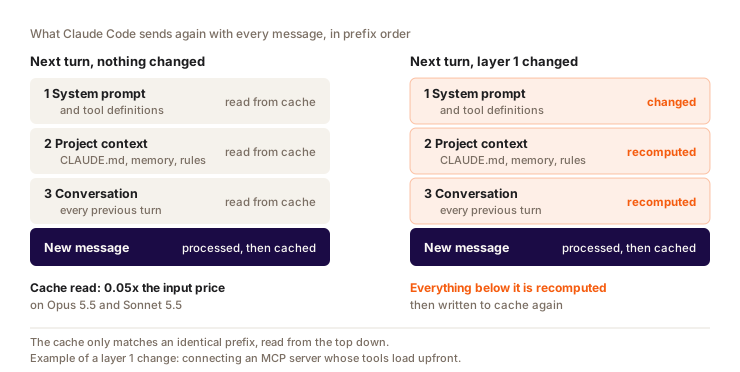
The cache has a lifetime:
| Situation | Main conversation | Sub-agents, forks and compaction |
|---|---|---|
| Claude subscription, within your quota | 1 hour | 5 minutes |
| Usage credits, API key, cloud provider (Bedrock, Google Cloud, Foundry) | 5 minutes | 5 minutes |
Past that, the first message rereads the whole conversation without cache. On a long session, that's expensive. On Pro and Max, when you pick up a big session with /resume after a long break, Claude Code offers to restart from a summary instead of rereading everything: say yes.
63,514 tokens before my first message even goes out: that's what an empty session weighs on my setup (system prompt, tools, CLAUDE.md, memory), 98.6% of it read from cache. Over 30 days, I counted 147 cold restarts and 11 model switches, each one paid at full price.
What this means in practice:
- A 3,000-line file opened at the third message follows you until the
/clear. Tell Claude where to look instead of letting it dig around. - Switching models means switching teachers: everything is reread. Pick it at startup. Effort, on the other hand, can be changed without breaking the cache on Opus 5.5, Sonnet 5.5, Haiku 5.5 and Fable 5.1.
- After a break of more than an hour (or five minutes on usage credits), the next message rereads everything without cache. If you come back for a different topic, run
/clear.
The numbers (cache pricing, what breaks it, how to check) are in chapter 19.
/rewind, going back
Sometimes Claude heads the wrong way: wrong technical approach, code that breaks everything, or cascading bugs. Don't fix it in the same context, the context is already polluted by the bad approach.
Typical case: Claude just refactored a component and the page shows 12 console errors. You type Esc Esc to roll back code and conversation in one go instead of debugging.
How: type Esc Esc (double Escape) or /rewind. You pick an earlier message, and Claude undoes the code changes AND rolls the conversation back to that point. A giant Ctrl+Z.
In the /rewind menu, the "Summarize up to here" option summarizes the conversation up to the chosen message. Useful when the start of the session is long and no longer needed, while what follows still matters.
Why /rewind beats fixing by hand: when Claude fixes a bug it just created,
it has the wrong instructions in memory. With /rewind, it starts again from
the right context and takes a different path. And since it goes back to a
conversation start that's already cached, it's cheaper than a /compact.
Step by step: a feature that spins out of control
Say you want to add filters to a task list.
- You brainstorm, you plan, you run
Execute the plan. - Claude starts well, then decides to refactor your whole
TaskListcomponent to fit the filters in. It breaks pagination along the way. - You test
localhost:3000, the list is empty, the console spits out 12 errors. Debugging in the heat of the moment is a trap. - You type
Esc Esc. Claude rolls back the code and the conversation, your repo is back to where it was before things drifted. - You run
/contextagain to check what's left in the window. - You replan, more precisely this time: "Add the filters without touching the existing pagination. Create a separate
TaskFilterscomponent that takestasksas props and returnsfilteredTasks." - You run the execution again. This time the scope is clear, and Claude delivers clean code in 15 minutes.
Total: 5 minutes lost on the first attempt, and no debugging under pressure.
/resume, /rename, /branch, /fork: finding and duplicating a session
If your terminal crashed or your Mac restarted, the session isn't lost.
/renamegives the current session a name. Do it before a/clear, you'll find it faster./resumelists your recent sessions. You pick one, Claude reloads the conversation. From the terminal,claude --continuegoes straight back to the last one./branch [name]creates a branch of the conversation at this point and switches you to it. You try another direction, the original stays intact and you get back to it with/resume./forkcopies the conversation into a background session, which works in its own worktree (a separate Git working copy) before touching the code. You keep going here while the copy moves forward. It reads from the original conversation's cache.
In the morning, you open your laptop and want to pick up last night's Stripe feature. You run claude, type /resume, and pick "stripe-checkout" from the list.
Watch out the next morning: a session resumed after a night has lost its
cache. The first message rereads the whole conversation at full price. If
Claude Code offers to resume from a summary, accept. And check with /context
what you're dragging along before starting again.
Commit often
Commit as soon as a task is done, at least once an hour. Why?
- Each commit is a save point you control.
/rewindgoes back within the session, a commit stays after the session ends - The more you commit, the tighter the safety net
- It's also a mental signal: "this task is done, on to the next one"
After each feature or fix:
/code-review, then "commit". No need to wait until you've finished 3 features.
Question
You're on Max, within your quota. Your session is at 300,000 tokens. You go to lunch for 1.5 hours, come back and send a message in the same session. What happens?
Pick an answer to see the explanation.
Key takeaways
- Brainstorm, plan, execute, check, review, memory: after 2-3 sessions, you stop thinking about the order.
/contextto see what's filling the window,/usagefor what you've used.- New topic:
/clear, free./compactis for when you're out of room on the same task, and/rewindfor when Claude took a wrong turn. - With 1M of context, watch the quality and cost of each message more than the percentages. And after a break of more than an hour (five minutes on usage credits), the next message rereads everything without cache.
End-of-part quiz
Part 2: Communicate and plan
6 questions. You pass the part with 5 correct answers or more.