A feature started without a plan often ends in a rewrite. We go through the
2-document method I use, then native plan mode, opusplan, and /goal to
carry the plan through to the end.
Why plan first
The biggest beginner mistake: asking straight away for "build me this feature". Without a plan, Claude makes technical choices without asking you, and you find out too late, sometimes after it has broken an existing feature without noticing. Or it misreads your request, and you have to redo everything.
The ratio: 10 minutes of planning = 2 hours of rework avoided. I've checked it on dozens of features I've built.
The 2-document method
We'll start from a concrete example: a publishing streak system for freelancers. We'll take it from the first brainstorm all the way to an executable plan.
Document 1, the Design Doc (the what)
The product vision. It answers: what are we building, for whom, and why?
You start with a brainstorm:
"Brainstorm a publishing streak system. Context: freelancers publish 1-2 times and then give up. I want a gamified system that pushes them to publish regularly."
Claude proposes 3-4 approaches with the pros and cons of each:
Daily streak (Duolingo style)
Easy to understand but punishing, one missed day = everything lost. A bad fit for freelancers who can't publish every day.
Weekly streak (recommended by Claude)
More flexible, fits the freelance rhythm (1-2 posts/week). Any day works, as long as you publish every week.
Points + levels system
Rich gamification with visible progress, but harder to build and potentially distracting from the core of the app.
The choice is yours: you're the one who knows what will motivate your users. Claude then writes the final design doc with the option you picked.
What goes in the design doc
A concrete example for the weekly streak:
- Problem: 80% of freelancers who sign up stop publishing after 2 weeks. We want to build a habit.
- Chosen solution: weekly streak, validated by 1 publication per week from Monday to Sunday.
- User stories: "When I publish content, my counter goes up by 1. When I reach 4 consecutive weeks, I get a badge. When I miss a week, the counter resets to 0 but I can see my best streak."
- Business rules: a week = Monday 00:00 to Sunday 23:59 (user's time zone). The streak breaks if there's no valid publication over a full week.
- Out of scope: no leaderboard between users, no push notifications, no monetary rewards. Pushed to v2.
Document 2, the Implementation Plan (the how)
The technical roadmap. It answers: which tasks, in what order, with which checks?
You ask:
"Write the detailed implementation plan for the weekly streak described in docs/plans/2026-03-01-streak-design.md. List each task with the files to create or modify, the verification commands, and the order of execution."
Claude produces a numbered plan:
Task 1: SQL migration, create the streaks table with columns user_id, current_streak, best_streak, last_publication_date
File: supabase/migrations/20260301_streaks.sql
Check: npx supabase migration up --local
Task 2: Regenerate the TypeScript types
Command: npx supabase gen types typescript --local > src/lib/types/database.types.ts
Check: npm run typecheck
Task 3: Server Action, calculate and update the current streak
File: src/lib/actions/streak.ts
Check: npm run typecheck && npm run lint
Task 4: UI component, animated flame + counter
File: src/components/dashboard/publishing-streak.tsx
Check: npm run typecheck + visual check
Task 5: Integration into the dashboard
File: src/app/app/page.tsx
Check: test visually on localhost:3000
Task 6: Unit tests
File: tests/unit/actions/streak.test.ts
Check: npm run test
What makes a good plan
- Each task has a single clear goal
- The order follows the dependencies (database before logic, logic before UI)
- Each task has a specific verification command
- Independent tasks are flagged (they can run in parallel)
Where to save the plans?
Create a docs/plans/ folder in your project. Name each file with the date and the feature name:
docs/plans/
  2026-03-01-streak-design.md      ← the design doc
  2026-03-01-streak-plan.md        ← the implementation plan
  2026-02-28-notifications-design.md
  2026-02-28-notifications-plan.md
These files stay in the repo and document the project as you go. When you wonder "why did we make that choice?", the answer is in the design doc.
Quick alternative: native plan mode
For medium-sized features, Claude Code has a plan mode that saves you from creating separate files.
A permission mode where Claude reads your code, explores, asks its questions and writes a plan, without changing a single file. It only takes action once you've approved the plan. Handy when you want to validate the approach before it touches the code.
- Press Shift+Tab until you see
plan mode onin the status bar, or type/planfollowed by your description. - Describe the feature as usual.
- Claude shows you its plan and waits for your go-ahead.
Ctrl+Gopens the plan in your editor if you want to edit it by hand. - You choose: "Yes, and use auto mode" (it executes in auto mode), "Yes, manually approve edits" (you approve each change), or "No, keep planning" to tell it what to change.
Faster than the design doc + plan method for features that don't need lasting documentation. And entering or leaving plan mode doesn't break the cache: its instructions get added at the end of the conversation and the model stays the same.
When to use which? Complex or structural feature → design doc + plan in
docs/plans/. Medium feature or fix → native plan mode (Shift+Tab).
opusplan: Opus thinks, Sonnet executes
The opusplan model alias runs Opus 5.5 during plan mode and switches to Sonnet 5.5 for execution. The idea: pay for the most expensive model only for the thinking, and let the cheaper one type the code.
/model opusplan
Watch the cache. With opusplan, every time you enter or leave plan mode
the model changes, and what Opus cached is no use to Sonnet. So the next
message rereads the whole conversation without cache. On a short session with
a single plan, it's worth it. On a long session where you go back and forth
ten times between plan and execution, stick to one model. The math is in
chapter 19.
Executing the plan
Once the plan is approved (file or chat), one sentence is enough:
"Execute the plan in docs/plans/2026-03-01-streak-plan.md"
Claude reads the plan, runs each task in order, checks between each step, and asks for your approval at key moments (typically: UI design choices, ambiguous business logic).
Your role in the meantime: review what it does and answer its questions.
Going all the way with /goal
On a long plan, Claude sometimes stops halfway to give you an update. If you want it to keep going to the end, give it a stop condition with /goal:
/goal all tasks in docs/plans/2026-03-01-streak-plan.md are done, npm run typecheck and npm run test pass
After each turn, an evaluator model checks the condition and decides whether Claude keeps going:
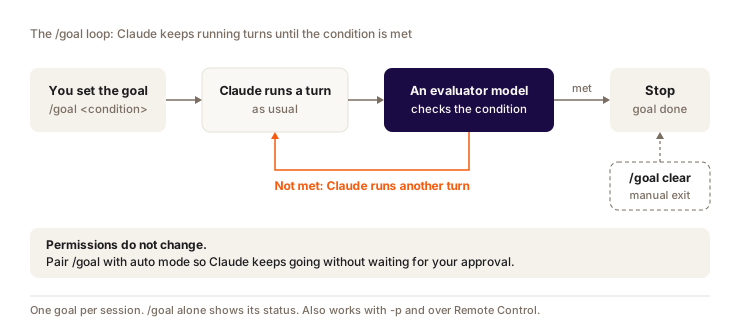
The evaluator is a small, fast model, and its token cost is usually negligible. It doesn't run any commands or read any files: it judges from what Claude showed in the conversation. So write a condition that Claude's output can prove ("npm run test passes" rather than "the code is clean"). To cap the loop, add a clause like "or stop after 20 turns".
/goal doesn't change permissions: in manual mode, Claude will still ask you before running commands. To let it work alone, combine it with auto mode. And remember /goal clear: on October 3, 2026, a goal I had forgotten about restarted Claude 20 times. The rest of autonomy (/loop, routines, workflows) is in chapter 18.
Handling surprises during execution
A plan always shifts a bit along the way. The usual cases:
| Situation | What to do |
|---|---|
| A check fails | Claude fixes it automatically and tries again. If it fails twice, it asks you for help. |
| You change your mind on a design choice | Say so right away. Claude adapts and adjusts the rest of the plan accordingly. |
| A task is more complex than expected | Claude splits it into subtasks and carries on. |
| You discover an unplanned need | Add it to the plan: "Add a task 7: send a congratulations email when the streak reaches 4 weeks." |
Question
You've set /model opusplan. In a long session, you go back and forth ten times between plan mode and execution. What happens to the cache?
Pick an answer to see the explanation.
Key takeaways
Brainstorm, design doc, plan, execution: that's the sequence that saves me the most rework. For a medium feature, plan mode (Shift+Tab) is enough and keeps the cache.
opusplansaves money on execution, but every model switch rereads the whole conversation without cache./goalkeeps Claude going until a verifiable condition is met. Remember/goal clear.