You asked for a login page and Claude made half the rules up for you? Here's how to write the request so you get it right the first time, and when to turn up the thinking effort.
The golden rule
Be precise about the what and the why. Let Claude handle the how.
You can brief Claude without knowing how to code, as long as you know what you want and why. Translating that into code is its job.
The 5 types of prompts
1. Building something new
You want a new page, a component, a feature.
Vague: "Make me a login page."
Claude will make random choices: which design, which fields, where to redirect after login, which error message?
Precise:
"Create a login page with email and password. Use Supabase Auth. After a successful login, redirect to /app. If the email doesn't exist, show 'No account found with this email' in red under the field. If the password is wrong, show 'Incorrect password'. Follow the project palette."
Claude has nothing left to guess.
What makes the difference: the acceptance criteria. Instead of "make a page", describe what should happen when it works, and when it doesn't.
2. Fixing a problem
Something doesn't work. Describe what you see vs what you expected.
Vague: "The button doesn't work."
Which button? On which page? What happens when you click? Nothing? An error? The wrong behavior?
Better:
"On the /app/strategie page, when I click the 'Generate my strategy' button, nothing happens. I expect to see a loading state, then the generated strategy showing up below. The button stays clickable, no spinner, no error in the console."
3. Understanding existing code
You want to understand how something works before changing it.
"Explain how the brand scoring system works. Show me the files involved and the data flow from the calculation to the display."
"Walk me through a user's journey from signup to their first content generation. Which files does it go through?"
Claude will move through the code and explain it to you like it would to a coworker.
4. Iterating on a result
The first draft rarely lands. Count on 2 or 3 rounds of feedback to get where you want.
"The form works well. I'd like real-time validation on the email field, so it checks the format while typing and not only on submit. Also disable the button until the form is valid."
"The page works but the design is too basic. Add light shadows on the cards, more breathing room between sections, and a subtle animation when the data loads."
5. Exploring options
Before building, look at what's possible.
"What are my options for adding a notifications system to the app? Compare email, push, in-app, and webhook. Give the pros and cons of each for a B2B SaaS with 100-500 users."
Claude will compare the approaches with concrete criteria: cost, complexity, UX, maintenance.
Useful phrasings
A few phrasings trigger a specific behavior:
| Phrasing | What it triggers |
|---|---|
| "Brainstorm..." | Claude explores 3-4 approaches with pros and cons before writing any code |
| "Plan the implementation of..." | Claude produces a numbered, task-by-task plan with the files involved |
| "Execute the plan in..." | Claude reads the plan and runs it in order, with checks between each step |
| "Check that everything compiles and passes the tests" | Claude runs typecheck + lint + tests and fixes the errors in a loop |
| "Update the project memory" | Claude saves the decisions made for the next sessions |
| "Do it in parallel" | Claude runs several independent tasks at the same time (faster) |
Setting the thinking effort
To make Claude think more (or less), the official setting is called effort.
The amount of reasoning the model allows itself before answering and at each
step. Five levels: low, medium, high, xhigh, max. The higher it is,
the more edge cases Claude tests and the more it checks its work, and the more
thinking tokens it produces, billed like written text.
/effort high
Typed like that, the level becomes your default for that model, including in later sessions. With no argument, /effort opens a slider: Enter saves the level, s applies it to the current session only. You can also set it at launch with claude --effort high. With no setting, Opus 5.5, Sonnet 5.5 and Haiku 5.5 run at medium, Fable 5.1 at high.
| Level | When to use it |
|---|---|
low | Renaming, fixing a typo, a quick question about the code |
medium | The default for 5.5 models. Most everyday work |
high, xhigh | A stubborn bug, a refactor touching lots of files, an architecture decision |
max | A very hard problem. Applies to the current session only |
I run high on Opus 5.5 for deep work, and lower it when I'm doing small touch-ups.
Choosing the effort goes hand in hand with choosing the model. The Claude Code costs docs give this grid:
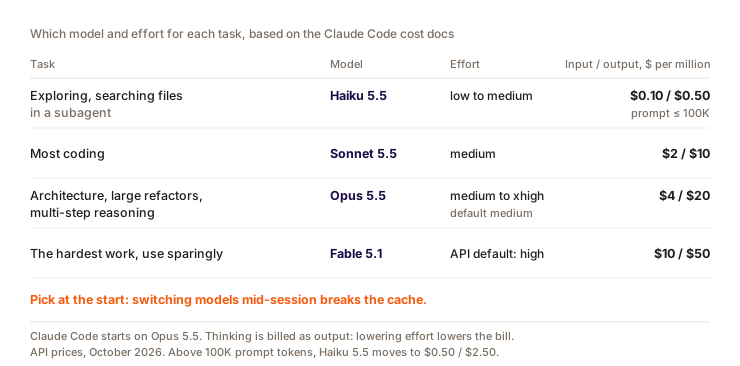
Effort costs money. Reasoning is billed like produced text (output, the most expensive kind), and on Opus 5.5, Sonnet 5.5, Haiku 5.5 and Fable you can't turn it off. To pay for less thinking, you lower the effort. Good news: on these models (subscription or API key), changing the effort mid-session doesn't break the cache. Details in chapter 19.
What about the famous "ultrathink" from old tutorials? It still works, but for a single message: Claude Code adds a deeper-thinking instruction to that turn, without touching your effort level. Variants like "think hard" or "think carefully" don't trigger anything special, Claude reads them as normal text. For a whole session, use /effort.
Don't confuse it with ultracode either: that one starts a workflow, meaning a script that has dozens of sub-agents working in parallel. Nothing to do with thinking depth, and it uses far more. It's covered in chapter 18.
Two techniques that save time
ASCII diagrams
Claude reads text diagrams with no trouble. When you want to explain an architecture, a data flow or how modules relate, draw it in ASCII instead of writing it out in sentences:
User → Login page → Supabase Auth
                        ↓
                   Session cookie
                        ↓
               Middleware checks auth
                        ↓
             /app page (Server Component)
                        ↓
              Server Action + auto RLS
Claude takes the diagram in and produces code consistent with the architecture you described. Often clearer than 3 paragraphs of explanation.
Screenshots, for what you can see
When you're stuck on a visual problem (broken layout, an element overflowing, the wrong color), take a screenshot and share it with Claude. Claude Code reads images: a capture shows the rendering and the page context in a second.
For a text error (console, terminal, build log), it's the opposite: copy-paste the text. An image costs more tokens than the same message as text, and Claude can misread a bit of stack trace in a capture. There's another side effect: past a certain volume of images, Claude Code removes the oldest ones from the conversation, which forces everything after them to be recomputed without cache.
A habit to build: visual bug → screenshot with "Here's what I see, here's what I expect". Error message → copy-paste the full text, not a capture.
Give the business context
Claude makes better choices when it knows what the feature is for. This is where your domain knowledge makes the difference: you know your users, it has never seen them.
With business context:
"Freelancers using our app often forget to publish their scheduled content. Create a reminder system that sends an email the day before each publication planned in the calendar. Tone: encouraging, not guilt-tripping. Email subject: include an emoji and the content title."
Without context:
"Add reminder notifications."
Claude doesn't know: when should it trigger? Which channel (email, push, in-app)? What tone? What data to include?
With the business context, one try is often enough. Without it, expect 3 or 4 back-and-forths.
The structure I use
For complex requests, I split them into four blocks:
- Context: why this feature exists (which user problem it solves)
- What: what you want to build (functional description)
- Criteria: what should happen when it works, and when it doesn't
- Constraints: technical, design or business limits to respect
Full example:
Context: our pro users pay $29/month and want to know how much content they've generated this month compared to their plan.
What: a progress bar component in the dashboard showing this month's AI usage (number of generations used / plan limit).
Criteria: show "12 / unlimited" for Pro users, "2 / 2" for Free users with the bar in red when it's full. When a Free user hits their limit, show an "Upgrade to Pro" button.
Constraints: use the data from the
ai_usagetable in the database. Follow the project palette. Reusable component.
The most common communication mistakes
| Mistake | Why it's a problem | How to fix it |
|---|---|---|
| "Improve the page" | Too vague, improve what? The design? Performance? UX? | "Add a loading animation and better spacing between the sections" |
| "Do it like the other page" | Claude doesn't know which page you want to copy | "Use the same layout as the /app/strategie page: sidebar + main content" |
| "It's ugly" | Subjective, Claude doesn't know what to change | "The cards are too cramped, add a 16px gap. The title is too small, make it 2xl." |
| Sending a screenshot with no context | Claude sees the image but doesn't know what to look for or what to fix | Always add "Here's what I see, here's what I expect" with the screenshot |
Question
You're on Opus 5.5 with your subscription, at medium. In the middle of a big session, you switch to high with /effort high. What happens to the cache?
Pick an answer to see the explanation.
Key takeaways
- Give the business why and the acceptance criteria: what happens when it works, and when it breaks.
/effort highfor a stubborn bug or an architecture decision.ultrathinkonly lasts one message.- Visual bug: screenshot. Error message: copy-paste the text.